The Baker’s Dozen of Use Cases

RULE 5: Focus on goals, not behaviour

There is a subtle distinction between the functional behaviour of the system and the goals of the actors.   This can cause confusion: after all, the functional behaviour of the system must surely be the goal of the actor?
It is very common, then, for engineers to write use cases that define, and then describe, all the functions of the system.  It is very tempting to simply re-organise the software requirements into functional areas, each one becoming a ‘use case’.  Paying lip-service to the ‘rules’ of use case modelling, these functions are organised by an actor that triggers the behaviour.

Use Cases based on functional requirements, rather than Actor goals.

I call these entities Design Cases to distinguish them from use cases; and they can be the first steps on the slippery slope of functional decomposition (see Rule 11 for more on this)

Identifying goals requires a change in mindset for the engineer.  Instead of asking “What functions must the system perform?” and listing the resulting functionality, ask: “If the system provides this result, will this help the actor fulfil one (or more) of their responsibilities”. If the answer to this question is ‘yes’ you’ve probably got a viable use case; if the answer’s ‘no’, or you can’t answer the question then you probably haven’t fully understood your stakeholders or their responsibilities.

In other words, the focus should be on the post-conditions of the use case – the state the system will be in after the use case has completed.  If the post-condition state of the system can provide measurable benefit to the Actor then it is a valid use case.

Let’s take a look at what I consider a better Use Case model:

Organising use cases by Actor Goal

The post-conditions of the use cases (above) relate to the goals of the Actor (in this case an Air-Traffic Control Officer).  We can validate whether the post-conditions will be of value to the Actor.

The (main success) post-condition of Land Aircraft is that one of the ATCO’s list of aircraft (that he is responsible for) is on the ground (safely, we assume!).  At this point the aircraft is no longer the responsibility of the ATCO – one less thing for them to worry about.  I argue that this is a condition that is of benefit to the ATCO.

Similarly with Hand-off Aircraft.  As aircraft reach the limit of the local Air Traffic Control (ATC) centre they are ‘handed-off’ to another ATC centre; often a major routing centre.  The post-condition for the hand-off will be that the departing aircraft will be (safely!) under the control of the other ATC, and removed from the local ATCO’s set of aircraft he is responsible for.

Receive Aircraft is the opposite side of Hand-Off Aircraft.  That is, what happens when the ATCO has an aircraft handed over to them from another ATC region.  At the end of the use case, the ATCO must have complete details and control of the received aircraft.

When an aircraft takes off, the aircraft must be assigned to an ATCO, who is responsible for routing it safely out of the local ATC region.  The post-condition of Take-Off Aircraft must be that the aircraft is assigned to an ATCO and that ATCO has all required details of the aircraft’s journey.

In the last two use cases, the ATCO actually gains work to do (another extra aircraft to monitor).  The requirements of the system must ensure that when the new aircraft is received the transfer is performed as simply, or consistently, or straightforwardly, as possible.  This is the benefit to the Actor.

While one could easily argue this is a simplistic model for Air Traffic Control it demonstrates basing use cases on goals rather than functional behaviours.  Each use case is validated by its post-conditions, rather than its pre-conditions and behaviour.


<<Prev     Next>>

Posted in Design Issues, UML | Tagged , , , , , | 1 Comment

The Baker’s Dozen of Use Cases

RULE 4 : The “Famous Five” of requirements modelling

As I discussed in Rule 1, a common misunderstanding of use cases is that they are the software requirements. Unfortunately, this isn’t the situation. Use cases are merely an analysis tool – albeit a very powerful tool (when used in the right situation).

Use cases are just one technique for understanding and analysing the requirements. In order to fully understand the requirements our use cases are going to need some support. Use cases are just one of my “Famous Five” of requirements analysis models.

The Requirements models are:

  • The Use Case model
  • The System Modes model
  • The Context model
  • The Domain model
  • The Behaviour model

Why five models? Well, each one tells me about a different aspect of the system. No one point of view can tell me everything I need to know in order to ensure my requirements are coherent, consistent and unambiguous.


The Use Case model is focussed on interaction behaviour: the who, how, what and when of interaction between the stakeholders and the system.
Use cases focus on operational scenarios. For some systems (especially a lot of application software) the (transactional) exchange of information between the users, or other direct interactors, and the system forms the bulk of the software functional requirements.
However, many embedded systems are not user-centric, or transactional in their behaviour (for example, a closed-loop control mechanism). Anyone who has attempted use case analysis on such systems tends to find the use case model is non-intuitive to construct; and tends not to yield very much information about the behaviour of the software.

The Use Case Model


The System Modes model defines the temporal behaviour of the system. That is, how the behaviour of the system changes of time, in response to external (and internal) stimuli.
The System Modes model allows the analyst to capture when and how the system functionality is available. The System Modes model is a declarative diagram, showing the behavioural modes of the system (without saying how the behaviour will be enacted) and the signals or events that cause the behaviour to change.
Application software may not be modal: it’s either running or it’s not. Embedded systems tend to have more complex dynamics (I see the system dynamics as one of the big differentiators between embedded software and application software). There are typically states where the system’s primary functionality is available, and other states where it is not. For example, most embedded systems cannot provide their primary functionality when they are starting up, or shutting down, or in a maintenance mode.

The Modes Model


The Context model defines the physical scope of the system: what is part of the system (under your control) and what is external to the system.
When creating requirements it is vital to separate the Problem Domain (the part of the real world where the computer is to exert effects) from the Solution Domain (the computer and its software). In fact, requirements should be describe in terms of the effects the system should exert in the Problem Domain (rather than how it should be designed). In addition there must be specifications for what are called Connecting Domains – that is, how the system’s input/output devices must behave (interface specifications).
The Context model gives a clear visual delineation of the Problem Domain (the environment), the Solution Domain and the Connecting Domains. The software is treated as a single black-box entity. The environment consists of the Direct Interactor stakeholders. Each Stakeholder interacts with the system via one or more interfaces (often called Terminators). For each element on the Context model there should be a set of requirements. In this example I have simulated a Context Model using a SysML Internal Block diagram.

The Context Model


The Domain model focuses on the information (that is, data) in the system and, more importantly, the relationship between the information.
The domain model aids with building a project ‘glossary’. In any project there is a huge amount of tacit information about how the problem domain operates, and the language that is used to describe it.
The focus of the Domain model is understanding the problem and describing it, rather than specifying the problem’s solution. Typically, a form of entity-relationship diagram is used. With UML, a class diagram is used (or a Block Definition Diagram in SysML).
It is tempting for development teams to skip this stage; the argument being “well, everybody knows this!” By actively and coherently modelling this information you may well avoid implicit misunderstandings; that can cost a project dear, if found too late.

The Domain Model


The Behavioural model captures the transformational aspects of the problem. The Behavioural model focuses on sources and sinks of information, and what transformations are performed by the system in between.
Although ultimately all software behaviour comes down to executing imperative code, this should be avoided for requirements analysis. Rather, focus on declarative statements of behaviour and where the data comes from (and goes to) rather than how the algorithms will be implemented.


The great strength of producing multiple models of the same system is that they are self-validating. Building a consistent set of models gives confidence that the analyst has truly understood the problem.
Concepts defined in one model must not conflict with the same concept in another model. For example, stakeholders defined in the Use Case model (its actors) must also appear on the Context model (otherwise, how are they interfacing to the system?!); similarly, the Use Case model should not mention any data or information that is not captured on the Domain model.
As I wrote in Rule 1, systems tend to have a predominant characteristic – that is, they will either be a Modal problem, a Transactional problem, a Flow-of-materials problem or a Data-Driven problem. When you are building your models of the system one or two diagrams will tend to give you more information than any of the others. For example, in a data-driven problem the Domain model will probably give you more information about the behaviour of the system than, say, the Modes model or Use Case model. The table below gives an indication of the relative value of each of the models.

Different models will have different value, depending on the type of problem.


<<Prev     Next>>

Posted in Design Issues, General, UML | Tagged , , , , , , , , , | Leave a comment

EMBEDDED PROGRAMMERS’ GUIDE TO THE ARM CORTEX-M ARCHITECTURE

At Embedded Live 2010 I shall be presenting a half-day tutorial entitled “EMBEDDED PROGRAMMERS’ GUIDE TO THE ARM CORTEX-M ARCHITECTURE”.

Feabhas have been training embedded software engineers in languages and architectures for the last 15 years. For the last decade we have been using ARM based target systems for all our programming based courses (C, C++ and testing – ARM7TDMI) and embedded Linux courses (ARM926). However with the development and release of the new generation Cortex micros we are moving our training over to Cortex-M for the languages and Cortex-A for Linux.

As part of this exercise we have to spend lots of time getting to know the Cortex microprocessors in detail, looking at different implementations and various support tools and environments.

The majority of supporting material around the new generation of ARM Cortex-M architectures (M0, M3 & M4), unsurprisingly, focuses heavily on the key hardware specifics of the microcontroller core, with most coding examples being in THUMB2 assembler. However the majority of programming for the Cortex will be in the C programming language (recently a VDC report showed C is still head-and-shoulders above other languages for embedded programming )

Core Features

This class looks at all the really useful features added to the Cortex-M that makes it a truly excellent target environment for the embedded software engineer.  As a simple example many embedded processors do not support integer division in hardware (e.g. ARM7), so division typically handled by an intrinsic library function call or compiler ‘tricks’

The new Cortex-M3 has new signed and unsigned integer division instructions, that can also support modulo operation ( x % y )

There are many other features that I shall cover including unaligned-transfers, bit-banding and the new improved interrupt support architecture (NVIC).

However, there are three other significant supporting technologies that really help the software engineer.

  1. Cortex Microcontroller Software Interface Standard (CMSIS)
  2. Debug Support
  3. RTOS Support

CMSIS

Simply put, CMSIS is a collection of source files (.c, .h and assembler) to create a minimal board support package (BSP) for Cortex-M series processors. Very usefully, it defines a common way to access peripheral registers and define exception vectors. It also defines the register names of the Core Peripherals and the names of the Core Exception Vectors. So, instead of having to spend time and effort defining structs for register definitions for onboard devices (or hoping you development environment has already done this for you) you can be assured that they already exist. For example, the NXP LPC17xx family of microcontrollers support a watchdog timer. Being CMSIS compliant, then the supplied header LPC17xx.h defines the register layout and necessary #defines:

Debug Support

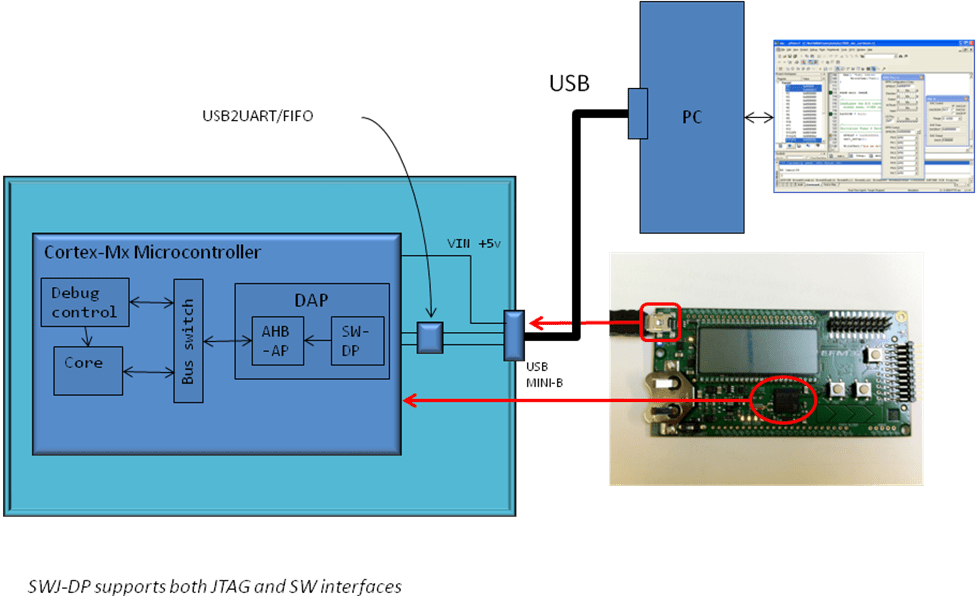
JTAG units, such as the Keil ULINK, have made target programming and source-level debug very affordable. However, for small pin count micros, the 4-wire JTAG is seen as quite expensive option (in terms of pure pin-count). As part of the Cortex-M core is support for a new serial-wire interface. The advantage being that it only requires 2-wires, which makes it very easy and affordable to support debug (and power) over a simple USB connection.

At the other end of the spectrum, ARM have added the option for an Embedded Trace Macro (ETM) unit, which allows features such as debug of events in real-time systems where the target cannot be halted and software profiling and code coverage.

RTOS Support

For someone who has a long background in Real-Time Operating Systems, I was very interested to discover how ARM has made it simpler and easier for an RTOS vendor to support the Cortex-M.  As you can guess CMSIS is a huge step forward, as it means once an RTOS has been ported using CMSIS, the core aspects will work on, say, all Cortex-M3 implementations.

As a simple example, pretty much all RTOS require a time-frame reference (the “tick” timer) for timeouts and delays, etc.  ARM has integrated this directly into the core (called Systick) rather than each silicon vendor having to implement their own count-up or count-down variant. There are already 20+ RTOSs running on the Cortex-M.

Also as, as an optional part of the Cortex-M3/M4 core is a memory-protection unit. An RTOS can make use of this to create a safer multitasking platform without the expense of a full-blow MMU.

Finally, what makes the Cortex-M so attractive from a embedded software engineers perspective is to abundance of low cost evaluation kit, such as mbed, LPCXpresso, STM32 Value line Discovery, Energy Micro Gecko Starter Kit, and Actel’s  SmartFusion to name just a small selection.

I hope to see you at Embedded Live 2010. If so please come and say hello.

Posted in C/C++ Programming, General, RTOS, training | 1 Comment

The Baker’s Dozen of Use Cases

RULE 3: Never mix your Actors

The UML definition of an Actor is an external entity that interacts with the system under development. In other words: it’s a stakeholder.

Having analysed all your stakeholders (see Part 3 ) it’s tempting to stick them (no pun intended) as actors on a use case diagram and start defining use cases for each.

Each set of stakeholders (Users, Beneficiaries or Constrainers) has its own set of concerns, language and concepts:

Concerns.
Each stakeholder group has a different set of issues, problems, wants and desires. For example, Users are interested in functionality; Constrainers in compliance.

Concepts.
The way a system is perceived by the stakeholders depends on their viewpoint, their needs, their technical background, etc. Each group’s paradigm – their way of perceiving the system – will be different and involve often subtly different concepts. For example, Users may have no concept of return-on-investment (RoI) for the system; whereas this may be a key concept to a Beneficiary.

Language.
Just as concepts are different; so is the language used to describe them. In many cases, the same word is used in different contexts to mean different things. For example: how many different concepts of ‘power’ can you think of? Mechanical, physical, electrical, political…

It is vital never to mix actors from different stakeholder groups on the same use case diagram. Trying to mix actors leads to ambiguity and confusion; both for the writer and reader! The differences in concept, viewpoint and language will make the use case almost impossible to decipher and understand.

Use a separate use case diagram for each set of stakeholders

By all means draw a separate use case diagram for each set of stakeholders. (Note: non-User stakeholder use case descriptions is beyond the scope of this article)


<<Prev     Next>>

Posted in Design Issues, UML | Tagged , , , , | Leave a comment

Scope and Lifetime of Variables in C

In a previous posting we looked at the principles (and peculiarities) of declarations and definitions. Here I would like to address the concepts of scope and lifetime of variables (program objects to be precise).

In the general case:

  • The placement of the declaration affects scope
  • The placement of the definition affects lifetime

Lifetime

The lifetime of an object is the time in which memory is reserved while the program is executing. There are three object lifetimes:

  • static
  • automatic
  • dynamic

Given the following piece of code:

int global_a;       /* tentative defn; become actual defn init to 0 */
int global_b = 20;     /* defn and implicit-decl */

int f(int* param_c)
{
   int local_d = 10;
   . . .
   return local_d;
}
int main(void)
{
   int *ptr = malloc(sizeof(int)*100);
   ...
   global_a = f(ptr);
   ...
   free(ptr);
}

global_a and global_b are static
The memory allocated by the call to malloc is dynamic
All others (including param_c, ptr and the return value from function f) are automatic.

Static Objects

The memory for static objects is allocated at compile/link time. Their address is fixed by the linker based on the linker control file (LCF).  You may know this file by another name such as linker-script file, linker configuration file or even scatter-loading description file. The LCF file defines the physical memory layout (Flash/SRAM) and placement of the different program regions.

The static region is actually subdivided into two further sections, one for initialised-definitions (int global_ b = 20;)  and one for uninitialized-definitions (int global_a;). So it would not be unexpected for the address of global_a and global_b to not be adjacent to each other in SRAM. The uninitialised-definitions’ section is commonly known as the .bss or ZI section. The initialised-definitions’ section is commonly known as the .data or RW section.
Finally, the initial value of global_a will be zero (0) and 20 for global_b.

Automatic objects

The majority of variables are defined within functions and classed as automatic variables. This also includes parameters and any temporary-returned-object (TRO) from a non-void function, e.g.

int f(int* param_c)  /* tro(int) and parameter(param_c) */
{  
   int local_d = 10; /* local variable */
   . . .
   return local_d;   /* copy local_d to tro */
}

The default model in general programming is that the memory for these program objects is allocated from the stack. For parameters and TRO’s the memory is normally allocated by the calling function (by pushing values onto the stack), whereas for local objects, memory is allocated once the function is called. This key feature enables a function to call itself – recursion (though recursion is generally a bad idea in embedded programming as it may cause stack-overflow problems).
In this model, automatic memory is reclaimed by popping the stack on function exit.

Within a function variables may be localised to a block associated with a control structure, e.g.

for(x = 0; x < N; ++x) {
   int block_y = 0;   /* nested local variable */
   . . .
}

Here the memory is allocated on entry to the block and reclaimed on exit.
However, on most modern microcontrollers, especially 32-bit RISC architectures, automatics are stored in scratch registers, where possible, rather than the stack. For example the ARM Architecture Procedure Call Standard (AAPCS) defines which CPU registers are used for function call arguments into, and results from, a function and local variables.

Importantly, if an automatic is not explicitly initialised, then the initial value is indeterminate (thus garbage) and therefore should never be read before being set. If the automatic is explicitly initialised then the memory is reinitialised on each call of the function.
The location and size of the stack are typically defined using the LCF.
Finally, there still are the (historic) keywords auto and register that can be applied to automatics. Both are pretty much redundant in modern programming.

Dynamic Objects

Strictly speaking (according to the C standard) dynamically allocated objects are also called automatics. However, it is important to differentiate between this type of object and automatics for two reasons:

  1. The memory is allocated from a different memory area (the heap not the stack)
  2. The lifetime is under the control of the programmer rather than the C run-time system.

When calling on malloc, calloc or realloc, these functions return an address (void*) for a block of dynamically allocated memory. The lifetime of this memory is from allocation until the call to either free or realloc the memory.

The realloc function takes an allocated memory block and expands (or contracts) it to a bigger (or smaller) size. This may involve moving the chunk of memory and copying over the old contents. When this is done, the old contents are automatically freed.

The contents of the memory return from malloc are indeterminate; whereas for calloc the memory is initialised to all zeros. If realloc expands the allocated memory area, then the contents of the extra expended area are indeterminate.
The size and location of the heap are also usually defined in the LCF.

Programming errors involving not releasing dynamically allocated memory have been, and still are, a major source of run-time errors (memory leaks). This is why most modern language use garbage collection (which limits their applicability to many real-time embedded applications) and why many coding standards, such as MISRA-C, ban dynamic memory allocation.

Static local variables

Before we leave lifetimes, there is one further anomaly. The keyword static can be applied to a local variable, e.g.

#include <stdio.h>
void f1(void)
{
   static int slocal = 10;        /* static local */
   int alocal = 10;              /* automatic local */
   printf("In f1: slocal = %d, alocal = %d\n", slocal, alocal);
   ++slocal;
}

int main(void)
{
   f1();
   f1();
   f1();
}

Applying static to a local variable changes the objects lifetime from automatic to static. This means that the memory is allocated at compiler/link time and its address in memory is fixed. However, as the memory is static these local variables retain their value from function call to function call. The local static is initialised only the first call of the function. So given the example above, the output is:
In f1: slocal = 10, alocal = 10
In f1: slocal = 11, alocal = 10
In f1: slocal = 12, alocal = 10

Local statics may look useful, however they cause major problems when trying to port code to a multi-task/multi-threading environment, and should generally be avoided where possible.

Scope

The scope of an object is the part of the program where the variable can be accessed (i.e. it is visible). The scope of an object generally falls into one of two general categories:

  • File scope
  • Block scope

As explained in the posting on declarations and definitions, a variable must be declared before it is accessed. Hence the scope of a variable is determined by the placement of its declaration. Returning to the previous example (slightly modified):

int global_a;       /* Decln and Defn */

int f(int* param_c)
{
   int local_d = param_c;       /* automatic local */
   static int local_s = 10;     /* static local    */
   . . .
   local_s = global_a;
   . . .
   return local_d;
}

int main(void)
{
   int *ptr = malloc(sizeof(int)*100);
   ...
   global_a = f(ptr);
   ...
   free(ptr);
}

In the example given, identifier global_a has file scope, whereas all other variables have block scope.

File Scope

Any variable declared with file scope can be accessed by any function defined after the declaration (in our example both f and main can access global_a). If global_a was declared after the function f but before main it would only be accessible within main.

Block Scope

Block scope is defined by the pairing of the curly braces { and } .  A variable declared within a block can only be accessed within that block. For example, local_d has block scope determined by the function-block for f and cannot be accessed outside that function. The variable ptr also has function-block scope limited to the main function. Note also that the local static, local_s, has block scope even though it has static lifetime.
Interestingly the parameter of function f, param_c, is also classed as have block scope. It can be accessed anywhere within the function it is a parameter of. Personally I would prefer to define this as “function” scope, but that would be incorrect according to the standard!

Within a function further localised (inner) scopes can be introduced, e.g.

for(x = 0; x < N; ++x) {
   int block_y = 0;
   . . .
}

Here, block_y is scoped to within the for-loop (i.e. it cannot be accessed in the for-expression region or outside of the for-block).

In a file and/or function we can have overlapping scopes, e.g.

int k = 20;
int main()
{
   int k = 10;
   printf( "In main, k is %d\n", k);
}

The rule is that an inner scope identifier always hides an outer scope identifier. Hence, the block-scoped identifier k hides the file-scoped identifier k (and thus the value displayed will be ten). Note that the file-scoped k is still in scope but is rendered invisible. It is generally bad practice to have variables with overlapping scopes.

Good programming practices limit scope as much as possible. By localising scope the potential for programming errors to creep in are significantly reduced.

Scope of Dynamic Objects

So it can be seen that the general case is that static objects have file scope and automatic objects have function scope. But what about the scope of dynamic objects?
A dynamic object doesn’t actually have scope, as such. In effect, its scope is dictated by the scope of any pointer holding the address of the dynamically allocated memory. As long as the pointer is in scope it can be dereferenced and the memory accessed.

External and Internal Linkage

Before leaving scope there is one final item to address. By default a variable with file scope can be accessed by any function in the whole program (e.g. in other files from where it is defined) as long as it is declared in scope for the function.
If a variable is defined with file scope in one file, but is required in another, then it can be brought into scope using the “extern” storage-class specifier, e.g.

/* file a.c */
int global_a = 10;       /* definition of global_a */

int f(int* param_c)
{
   int local_d = param_c;
   static int local_s = 10;
   . . .
   local_s = global_a;
   . . .
   return local_d;
}

/* file main.c */
extern int global_a;    /* declaration of global_a, now visible */
int f(int*);

int main(void)
{
   int *ptr = malloc(sizeof(int)*100);
   ...
   global_a = f(ptr);  /* global_a is visible so can be accessed */
   ...
   free(ptr);
}

Quite often we have the case where we need a variable with static lifetime, we don’t want it globally accessible (i.e. want to limit its use to functions in the current file), but we don’t want to define it as a local static as it is needed in multiple local functions.
To achieve this we can use the keyword static, but this time to affect scope rather than lifetime. If a file scoped variable is tagged as static then it has, what is called, internal linkage, e.g.

/* file a.c */
int global_a = 10;      /* external linkage – global scope */
static int internal_b;    /* internal linkage – this-file scope  */

int f(int* param_c)
{
   int local_d = param_c;   /* function scope, auto */
   static int local_s = 10; /* function scope, static */
   . . .
   local_s = global_a;
   . . .
   return local_d;
}

If another file tried to declare internal_b as extern, then this would result in a link-time error.
Note that internal linkage can also be applied to functions. All functions have external linkage by default, so it is very good practice to declare a function as static if it is only being used with the current file.

Next time: Why understanding Scope and Lifetime is important to embedded programming

Posted in C/C++ Programming | Tagged , , , | 6 Comments

The Baker’s Dozen of Use Cases

RULE 2: Understand your stakeholders

A Stakeholder is a person, or group of people, with a vested interest in your system. Vested means they want something out of it – a return on their investment. That may be money; it may be an easier life.


One of the keys to requirements analysis is understanding your stakeholders – who they are, what they are responsible for, why they want to use your system and how it will benefit them.

It’s important to understand (and difficult for many software engineers to accept!) your stakeholders have responsibilities above and beyond just using your product. In fact, the only reason they are using your product is because it (should!) help them fulfil their larger responsibilities. If your product doesn’t help your stakeholder then why should they use it?


The first step in requirements analysis is to define your stakeholders. That definition must include:

  1. A named individual responsible for the stakeholder group
  2. The stakeholder’s responsibilities. That is, a description of the roles, jobs, and tasks the stakeholders have to perform everyday. If you understand a stakeholder’s problems and needs you can define solutions that help them
  3. Success criteria. That is: what is a good result for this stakeholder? The success criteria are a list of features and qualities that, if implemented, would bring maximum benefit to the stakeholder group.


Not all stakeholders are the same. For analysis, I divide stakeholders into three groups using my ‘stakeholder onion’ model:


Users.
Users are the most obvious group of stakeholders. Users directly interact with the system under development (sometimes I call them ‘Direct Interactors’).  A system’s users are concerned with how things work – what buttons to press, what order events happen, etc.  Their focus is therefore primarily functional behaviour and human-centred system qualities-of-service such as usability.

Beneficiaries.
The beneficiaries have some need that the system fulfils (or some pain that needs to be taken away!). The beneficiaries therefore benefit (often financially) by having the system in place. Typically, these stakeholders will be paying for the system. Beneficiaries are less interested in function and more interested in quality-of-service – reliability, maintainability, etc. since if these requirements are not fulfilled it will cost them money!

Constrainers.

The Users and Beneficiaries of a system are concerned with the problem they need to solve.   The Constrainers are focused not on the problem domain but on the solution domain.  The constrainers place negative requirements – or design constraints – on the system.  They place limits on how the system can work, how it will be developed, or what technologies or methodologies may be used. Constrainers come in many forms – Legislation, Standards, The Laws of physics, to name a few.

Most engineers intuitively understand they are, in some way, a stakeholder in the system they are designing, but they often do not know how to express this.  The development team itself is a Constrainer stakeholder, since it places limits on the technologies that can be implemented (lack of skills) or timescales (lack of resource).


Not only do the different stakeholders have different viewpoints, they also have different priorities on your project:

Beneficiaries’ concerns typically (but not always) outweigh user concerns.  For example, in the conflict between usability (a user concern) and low cost (a beneficiary concern) who will win? Remember: He who pays the piper calls the tune…

Constrainers should over-ride beneficiaries. Legal requirements, standards requirements, skills shortages, etc. will always supersede the desires of the other stakeholders.

The core difference between Beneficiaries and Constrainers is that Constrainers CANNOT be influenced – that is, you can negotiate on functional behaviours or qualities of service, but you cannot negotiate away legal requirements or the laws of physics!  A Constrainer either exists, in which case their criteria must be met; or they are not a Constrainer.   The skill, therefore, is to reduce the number of Constrainers on a project to open up as many different design options as possible.


Where does all this fit into Use Case analysis?  The answer is two-fold:

  • Actors on a use case diagram are all stakeholders
  • Stakeholder analysis gives context to the Use Case.

An Actor is an “external entity that interacts with the system under development”.  In the simplest case, that means they’re a User stakeholder.  The Beneficiaries and Constrainers also influence and affect the system behaviour, albeit in a very different way to the Users.  

Actors, Stakeholder types and Use Cases is a potential source of problems; and we’ll discuss this in a later article.


The most important reason for performing stakeholder analysis is it gives context to the Use Case model.  The Use Case System Boundary element defines the functional scope of the system – that is, what behaviours the system is required to provide – but it doesn’t give any reasons why the system has to provides those features.   There is nothing on the Use Case diagram that gives any help in validating the Use Case model.   We can add any behaviour we like to the Use Case diagram, provided we can link it to an actor.

By providing a stakeholder analysis we can validate the Use Cases by asking questions such as: Does the Use Case behaviour help the stakeholder (actor) fulfil their responsibilities?  If the behaviour does not help any stakeholder fulfil their responsibilities, should we be implementing it, or have we missed a stakeholder?  Are there other (additional) behaviours the stakeholder may need in order to fulfil their responsibilities?


<<Prev     Next>>

Posted in Design Issues, UML | Tagged , , , , , | 1 Comment

The Baker’s Dozen Of Use Cases

RULE 1: Use Cases Aren’t Silver Bullets

There are a couple of popular misconceptions around use cases:

Misconception 1: The use cases are the requirements of the system

Contrary to what many engineers believe (and many authors have written) the complete set of use cases do NOT constitute its full set of requirements for the system.


A use case model is an analysis tool. They are a mechanism for organising the functional behaviour of the system and reflecting it back to the stakeholders. This is sometimes referred to as ‘Problem Reframing’. By re-framing the requirements to are aiming to achieve three things:

  • Demonstrate you have understood the problem, as the customer perceives it.
  • Capture information exchange and sequencing requirements.
  • Identify any missing behaviours

In order to achieve this effectively you need to generalise and abstract the customer requirements into something more manageable. Thus the use cases ‘reflect’ the system requirements without actually being the system requirements.

In embedded systems design the functional behaviour is but a small part of the requirements of the system. System developers must comply with a vast number of other requirements, including performance, reliability, security, environmental, useability, etc. Many of these are system qualities – that is, they apply to the system as a whole, not just the software. Use Cases are simply not an effective tool for capturing this information, despite attempts by several authors to incorporate them.


Misconception 2: You must always build a use case model

Engineering problems can be classified into four basic categories:

Data-oriented
In a data-oriented problem it is the information, and its relationship to other information, that is important.

Modal
Modal problems are characterised by having separate, distinct behaviours at different times. Trigger events from the environment will cause the system to change its behaviour.

Transactional
Transactional problems tend to be event-driven: A behaviour is (externally) invoked, which either produces a result or a change in the environment.

Flow-of-materials
Problems tend to be control-oriented: data/materiel moves from ‘sources’ to ‘sinks’. Algorithms and rules control how the information is moved and transformed.

While it’s perfectly correct to say that almost all systems have all these elements to some extent, in most cases one of the categories tends to dominate the requirements of the system.


Use cases are most effective when used to describe Transactional problems. Using Use Case analysis on other types of system often yields less-useful information about the system. In some cases Use Cases actually obfuscate the problem by attempting to re-frame one type of problem into a Transactional problem. For example, attempting to describe a flow-of-materials problem with use cases tends to yield trivial Use Cases and obscures the fundamental nature of the problem by trying to re-frame ‘flows’ as descrete ‘events’.


Use cases are a very powerful analysis tool – when used in the right way and under the right circumstances. But they aren’t a silver bullet. Use cases don’t solve every requirements analysis problem and they don’t necessarily suit every type of problem.

In order to use Use Cases effectively you must understand what type of problem you are trying to solve and whether use cases are the right tool for the job.


<<Prev     Next>>

Posted in Design Issues, UML | Tagged , , , , | 1 Comment

A Brief Introduction to Use Cases

Since Jacobson defined use cases back in 1992 they have been subject to a vast range of interpretations.   Alistair Cockburn, author of Writing Effective Use Cases states:

“I have personally encountered over 18 different definitions of use case, given by different, each expert, teachers and consultants”

I am no different: this is my personal interpretation of use case modelling and analysis.  To qualify this statement though, this methodology is based on nearly a decade of requirements definition work on a number high integrity projects, including military and aerospace.   That said, techniques that work in one environment may be less effective in another.  I haven’t been fortunate enough to work in every industry sector.   It may be, then, that you disagree with some of my techniques.  This is fine; I won’t think of you as a bad person.

In a series of articles I will present a set of guidelines, or rules-of-thumb.  Each of the ‘rules’ defines a good practice that I recommend when creating use cases.  Each rule forms a quality control on the requirements analysis process.  Ignoring a rule means there is an(other) opportunity for mistakes to creep into your requirements.

There’s no way I could capture every possible method or practice needed to create, analyse, review and maintain your use cases (well, short of writing a book on the subject).  I have decided to focus on a manageable number.  Ten would have been ideal; but that was too few and left out some important points.  Twelve still fell short, so I decided on a “baker’s dozen” – 13 rules.

To start, though, let’s have a quick review of Use Cases.

A brief overview of use cases

Use cases are a requirements analysis technique based on the conceit that (software) systems exist to fulfil the needs and desires of their stakeholders.  Stakeholders don’t use systems for the sake of it – they want to achieve something with the system that is of worth to them.  That is, the system must do something useful for the stakeholder, and in a fashion they expect or desire.

A use case is partial definition of a system’s behaviour, described in terms of a goal that a stakeholder of the system (called an ‘Actor’) wants to achieve, and how they achieve it.  A use case is described in terms of the interaction between the Actor and the system; specifically, it is defined in terms of the information that is exchanged between the actor and the system.

Fig 1.1 – The Basic Use Case Diagram

It is useful to think of a use case in terms of scenarios.  A scenario is a particular instance of interactions.  A scenario describes one possible way of interacting with the system (whilst trying to achieve that particular goal). When trying to achieve their goal, the Actor may have to make choices.  Also, things have a habit of going wrong.  Each variation is a different scenario.  The use case, therefore, is described by every possible scenario.  Obviously, attempting to document a use case by writing every scenario would be ludicrous for anything but the most trivial system.  The way round this is via a Use Case Description.

A Use Case Description is a structured English definition of all the use case steps.  It can be thought of as a’ blueprint’ for generating use case scenarios.  It should be possible to re-create any scenario from the use case specification.  In its basic form, a use case description is a series of steps showing how information is exchanged between the Actor(s) and the system until the Actor’s goal is met.  This flow is always initiated by an Actor (we don’t really want software doing stuff of its own accord!)  This basic form is called the Basic flow, or Main Success Scenario.  In the Basic flow nothing goes wrong and the Actor does the most normal, obvious things (this is sometimes called the “Sunny Day” scenario!)

However, when the Actor must make a choice, the use case description must fork – one path for each option the Actor can make.  Each of these descriptions is described in an Optional flow (sometimes called a Sub flow).

Similarly, not everything always goes right.  If something can go wrong in a scenario, chances are it will at some point (probably when the Actor least expects or wants it to!).  Typically, these conditions are not resolved by giving the Actor an option; they happen beyond the Actor’s control.  We have to record what happens when that ‘something’ goes wrong.  These descriptions are called the Exceptional flows.

Another very useful way of looking at a use case specification is in terms of its start and end conditions.  We can record all the possible start conditions that the system could be in; similarly, we can identify what state we expect the world to be in after we’ve finished.  The use case steps, then, map the initial conditions to the appropriate final conditions.

Finally, we throw in constraints.  A constraint is a requirement on not what the system does, but how it does it.  A constraint may define a performance requirement, a reliability requirement, a safety requirement, etc.  Each step in the use case specification can have one or more constraints applied to it.  It is difficult to document how the constraint manifests itself in the use case but it is easier to document what happens when a constraint is not met.  In this case the failure is treated as an exceptional condition.


<<Prev     Next>>

Posted in Design Issues, UML | Tagged , | 4 Comments

Elizabethan guidance on Object-Oriented software design

So what did the Elizabethans know about software development?  Well, in truth, nothing whatsoever.  But what they had begun to do is codify and systematise the knowledge and experience of masters in manuals, treatises and books.  Some of the earliest documents of this form refer to the martial arts or, as it was known at the time the ‘Arts of Defence’

In martial arts one learns practical skills (in this case how to defend oneself against any enemy) through practice and training.  The practical skills are usually an extension of some ‘core’ principles, which form the basis of the art.  These core principles state some fundamental truth about the nature of the art.  Without understanding these fundamental principles one is merely performing a ‘dance’ and one will never be truly effective.

George Silver

In the late 16th century George Silver, an English gentleman, wrote a martial arts treatise called ‘Paradoxes of Defence’ (A transcription of the original can be found here).  The treatise is well known in the Western Martial Arts community for being one of the earliest treatises in English; and also for Silver’s prolonged and somewhat vitriolic attacks against the Italian fencing masters of his day, who he saw as frauds.

Silver followed up his ‘Paradoxes of Defence’ with a more practical publication ‘Brief Instructions Upon My Paradoxes of Defence’  where he attempted to set out his fighting principles and practices (a transcription can be found here)

Silver used the phrases ‘True Fight’ and ‘False Fight’ to describe effective fighting techniques.  True fight was correct application of the principals of fighting; False Fight was to ignore, misunderstand or misuse the principals of fighting.  He also talked of ‘Perfect’ and ‘Imperfect’ fighting.  Perfect fighting had nothing to do with being a great fighter: as long as you used the correct technique all the time (the True Fight) then your fight was perfect; however skilled you were.  So a beginner, using the principals of the True Fight, even if slow and ungainly, was fighting a Perfect fight.  On the other hand, even if you were fast, skilled and deadly, if you used ‘False’ techniques Silver considered your fight to be ‘Imperfect’.   In Silver’s mind using correct principles was always superior to using ineffective techniques.  That didn’t mean the Perfect Fight always won; but that the Imperfect fighter was doomed, by definition, eventually to fail.

Silver based his techniques on what he called his Four Groundings and Four Governors.  The Four Groundings were the fundamental principles upon which all fighting – irrespective of the weapon used – were based.   The Four Groundings are tightly inter-related to each other.  Ignoring one principle will affect all the others (and lead to False fight).  Each Grounding must be understood, and how it affects all the others, also understood.

The Four Governors were the elements of a fight that controlled its outcome.  The Governors control your actions and your approach to the fight.  As the Governors change, so must your approach to the fight, and the techniques you can, or must, use.

The question is: can we apply Silver’s ideas of True Fight and False Fight to software development?  What is ‘True’ development; and what is ‘False’?  What are the Groundings of software development; and what are the Governors?  Can we define ‘Perfect’ and ‘Imperfect’ software?

‘Imperfect’ software development

Firstly we need to make a distinction between Correctness and Intrinsic Quality.  Correctness is the ability of software to fulfil its requirements.  Intrinsic Quality refers to how the software is designed and built – that is, how ‘good’ or ‘bad’ the software is.

Incorrect software, irrespective of how good it is, must be considered ‘Imperfect’ by our definition.  No matter how ‘good’ the software is, if it doesn’t fulfil its requirements, it’s useless (and if the requirements are wrong it’s also useless, or at least of questionable value).

Correct software must be our starting point.  Is all correct software Perfect?  Or should the ‘perfection’ of software be judged by its Intrinsic Quality?

If we apply Silver’s logic ‘Perfect’ software will always result from ‘True’ software development.  True development is that which applies the Four Groundings and Four Governors of software development.  So we need to understand what the Groundings and Governors are for software development.

The Groundings and Governors for software development must be those principles that give our software high intrinsic quality, both in its development (its static design, coding) and at runtime (its dynamic testing and execution).

What makes poor software?

It is challenging to define what makes ‘good’ software since we so rarely see it.  On the other hand most engineers are used to seeing (and maintaining!) what they consider ‘bad’ software.  Often engineers cannot qualify what makes the software bad; it just is.  Typically, though, bad software suffers from one or more of the following maladies:

It is difficult to understand.

The code is difficult to read; variable names are unhelpful; comments are missing (or worse, incorrect); code is badly structured and laid-out; etc.

It is fragile.

Fragile code will break at the slightest provocation.  Fixing a bug in one part of the code can cause a cascade of other bugs in other parts of the code; often quite un-related to the problem.

It is rigid.

Rigid code has been designed to fulfil one requirement – and that is all it will ever do.  If the requirements change the software must be almost completely re-written to support the new behaviour.

It is immobile.

Engineers often build really useful software modules.  However, if the useful module is so tightly intertwined with the structure of the program it’s in, the effort involved in unpicking the useful code is so great is often impractical to even try to re-use it somewhere else.  Sometimes it’s just easier to write it again from scratch.

The Four Governors

In Silver’s system understanding and controlling your Governors determined how successful you were in a fight.  If you fail to control your Governors you will ultimately lose the fight.  In engineering terms success can be measured in terms of money.  That is, failing to understand and control the software Governors will ultimately lead to spending more money (or making less money, however you want to look at it) than you need to.

Our Governors must therefore relate to the effectiveness of our software development.  Effectiveness is about doing things that add value; in contrast to efficiency, which is focussed on doing more work with less resource.

If the above qualities define bad software then the opposite must define good software.  Thus we can use our definition of bad software and invert them to give us our Four Governors of software development.  They are:

Comprehension

Good software must be easy to read and understand.  There should be no surprises in the code; its purpose and implementation should be obvious and equivalent.

Flexibility

It should require little effort to adapt existing software to new requirements.

Robustness

Software should be tolerant to invalid inputs.  Performance should be unhindered by incorrect inputs, or should be degraded in a known, controlled, way.  The impact of change should be controlled and limited.

Mobility

Software should be easily adapted to new environments, platforms or problem domains, without requiring major modification.

The Four Groundings

The Groundings are the set of (inter-related) principles upon which all actions are based.  The principles are normally inter-dependent – adjusting one principle often affects the others.  Thus the Groundings must be ‘balanced’ to meet the needs of the Governors.  As the Governors change, so must the application of the Groundings.

In software our Groundings are the principles of good, modular, design.  A module, in this case, refers to a unit of software construction (or decomposition, if you prefer).  A program is constructed of one or more modules.  A module should ideally be self contained, with a well-defined interface and a well-defined, localised purpose and functionality.

By correct application of the Groundings we achieve high intrinsic quality software.  Once again, our Groundings are inter-dependent – focussing on any one Grounding at the expense of the others is no guarantee of producing good software.

The Four Groundings of software development are:

Coupling

Coupling is the inter-dependence between modules.  The inter-dependence depends on the number of, and complexity of, connection between any two modules.

Ideally, we aim for low coupling – that is, a small number of simple connections.  Reducing the inter-dependency between modules allows greater flexibility in design and greater potential for re-use.

There is a compromise to be made between coupling and performance.  Typically, low-coupling comes at the expense of system performance; highly-coupled systems can often be much higher performance than lower coupled systems.

The engineer’s skill is in understanding when to design for low coupling and when to design for performance.

As a rule-of-thumb always design for intrinsic quality of code, monitor the actual performance, and only then optimise the coding or coupling of the key areas that need it. Most times the problem isn’t where you think it is (dynamically).

Encapsulation

Encapsulation literally means ‘to put in a capsule’.  Encapsulation is separating ‘what’ the module does (its interface) from ‘how’ it does it (the implementation).  Ideally, clients should never be able to directly access the module’s implementation – or even need to if the interface is designed well.

Strong encapsulation can reduce coupling by eliminating the ability of one module to access the internal behaviour or data of another module.

It enables the module to be easily tested in isolation before combining it with other modules that make up the program.

Encapsulation also provides ‘insulation’.  By separating the interface from its implementation the implementation may be changed without affecting the client code – in other words, the client is ‘insulated’ from change.

Cohesion

Cohesion defines how well elements fit together.  There are several models for cohesion in software (The most well known being Constantine’s 7-level scale of cohesion)  but most cover the following aspects:

Functional cohesion focuses on the coherence of the interface of a module.  For high cohesion the operations that form a module’s interface must be mutually self-supporting.  The operations should all contribute to a unified overall behaviour for the module   By contrast, the operations in a low cohesion module are independent and unrelated.  Removing or replacing any operation has no effect on any other operation in the module.  A highly cohesive module typically performs a single, high-level responsibility.

Temporal cohesion focuses on the concurrent or parallel execution behaviour of modules.  Modules that execute in sequence with one another executing in the same thread of control are temporally cohesive.  Modules that must run in parallel but are executing within the same thread of control are not temporally cohesive.

Contextual cohesion refers to design abstraction.  During design engineers should organise the design into different levels of detail; each level used to focus on a different aspect of problem definition.  For example, high level design should focus on architecture and design validation; lower level designs should focus on implementation and verification.  A cohesive design does not mix high and low level constructs on the same design.   For example, focussing on implementation artefacts during architectural design is inappropriate and therefore contextually non-cohesive.

Cohesive modules tend to limit the impact of change, since the change typically affects only the (related) operations/data in a single module; and has no impact on other modules.

Abstraction

Abstraction may be defined as filtering out detail that is unnecessary in the context being considered.

When we build software we are constructing models of the problem domain and manipulating them to provide some benefit to the customer.  Context is important because it defines how you view the situation:  what is relevant, that is, the abstractions that are useful in that context.

For any particular problem domain there are concepts that are important, and concepts that have no relevance.   A good abstraction captures the relevant information about the problem domain, and ignores the superfluous.  You could think of this as looking at a problem from a particular viewpoint.

Basing a design on problem domain abstractions provides resilience to change since the concepts of any particular domain are likely to remain stable over time; unlike implementation technologies which are likely to change rapidly.

The Four Groundings are all inter-dependent, but not necessarily mutually inclusive:  Although a good problem domain abstraction domain is likely to be cohesive, it can be made incoherent through bad design; a coherent module should provide strong encapsulation, but that can be broken through poor design; strong encapsulation should provide lower coupling, but poor cohesion in the design and poor abstractions may lead to increased coupling.

A good engineer must understand the Four Groundings in detail and how they inter-relate.

‘Perfect’ software development

True development is one that applies the Groundings and Governors:

A design with well-chosen abstractions of problem domain elements, strongly and cohesively encapsulated with low coupling.  Such a design is likely to be comprehensible, robust, flexible and mobile.

False development is one that ignores the Groundings and Governors:

An incoherent design, focussing on implementation elements, with poor encapsulation, weak cohesion and high coupling.  Such a design is likely to be incomprehensible, rigid, fragile and immobile.

A Perfect development is therefore one that is always True; Imperfect development is one where we use False techniques.

Of course, we can always ignore the Groundings and Governors and still produce working software; but this will always be (in Silver’s view) Imperfect.

Even if we aren’t particularly skilled with the Groundings and Governors as long as we apply them our development will always be True.  And we can always improve.

If we always choose the False development (cutting corners) our software can never be Perfect.

As it suggests Perfect development is an ideal; it is something to strive for.  We will almost certainly have to compromise our development because of time, resource or money constraints.  Wherever possible, though, we should aim for True development.

Perhaps those Elizabethans knew more about software development than we realise, after all.

Summary of the True development

The Four Governors

  • Comprehension
  • Flexibility
  • Robustness
  • Mobility

The Four Groundings

  • Coupling
  • Encapsulation
  • Cohesion
  • Abstraction
Posted in Design Issues | Tagged , , , , , | Leave a comment

Polymorphism in C++

The term polymorphism is central to most discussions in and around object oriented design and programming. However I find that many people are still confused or don’t have a complete understanding of the advantages and disadvantages of using polymorphism.

I have heard many different simplified definitions of the root term for polymorphism, usually relating to chemistry or biology. Rather than trying to justify the name, I’ll give you my very simplistic definition from a software perspective.  Simply put polymorphism means:

Multiple functions with the same name.

Yep, as simple as that.

Most C programmers don’t realise they have been using polymorphic operations since they started programming. Take, for example, the following code:

b + c

That’s a polymorphic expression. Why?  Well we know nothing about the types of b and c. If b and c are of type int then the code generated is significantly different to if they are double.

But, I hear to shout, what about virtual functions and all that?

So herein lies on of the main problems. When most people use the term polymorphism they are actually referring to Dynamic Polymorphism. The expression b + c is related to Static Polymorphism.

With static polymorphism, the actual code to run (or the function to call) is known at compile time. C++ Overloading is static polymorphic, e.g.

void swap(int* a, int* b);
void swap(double* a, double *b);
int main()
{
   int x = 10, y = 20;
   double a = 1.2, b = 3.4;
   swap(&x, &y);            // swap(int,int)
   swap(&a, &b);            // swap(double, double)
}

Here the compile, based on the number and type of arguments, can determine which function to call.

Dynamic polymorphism, which in C++ is called Overriding, allows us to determine the actual function method to be executed at run-time rather than compile time.

For example, if we are using the  uC/OS-II RTOS and have developed a Mutex class, e.g.

class uCMutex
{
public:
   uCMutex();
   void lock();
   void unlock();
private:
   OS_EVENT* hSem;
   INT8U err;
   // not implemented
   uCMutex( const uCMutex& copyMe );
   uCMutex& operator=( const uCMutex& rhs );
};

And have also implemented  a very simple stack class (note this code is just for explanation purposes and has many shortcomings) that requires mutual exclusion, it may look something along the flowing lines:

class myStack
{
public:
   myStack();
   bool push(int val);
   int pop();
private:
   static const int sz = 10;
   int m_stack[sz];
   unsigned int count;
   uCMutex tm;   // uCMutex Object
};
myStack::myStack(iMutex& m):count(0), tm(m)
{
   memset(m_stack,0,sizeof(m_stack));
}
bool myStack::push(int val)
{
   bool retval = false;
   tm.lock();    // LOCK
   if (count < sz) {
      m_stack[count++] = val;
      retval = true
   }
   tm.unlock();     // UNLOCK
   return retval;
}
int myStack::pop()
{
   int val = -1;
   tm.lock();       // LOCK
   if (count != 0) {
      val = m_stack[--count];
   }
   tm.unlock();     // UNLOCK
   return val;
}

If, then, in our new design we are going to use VxWorks rather than uC/OS-II, our stack class would require reworking, thus:

class VxMutex
{
public:
   VxMutex();
   void lock();
   void unlock();
private:
   …
};
class myStack
{
private:
   ...
   VxMutex tm;
};

Even though the change from the uC/OS-II mutex to the VxWorks mutex class is within the private part of the stack class, this still has many detrimental knock on effects. Significantly, we have changed the stack class’s definition, so all files that use the stack now need recompiling. This, then, has a knock on effect to the amount of regression testing that is required.

An alternative strategy is to use dynamic polymorphism and interfaces to make our code more testable and reusable.  So, by defining an interface class for the mutex abstraction:

class iMutex
{
public:
   iMutex(){}
   virtual ~iMutex(){}
   virtual void lock() = 0;      // pure virtual function
   virtual void unlock() = 0;    // pure virtual function
private:
   // not implemented
   iMutex( const iMutex&);
   iMutex& operator=( const iMutex&);
};

We can alter the stack code so the mutex object is passed in as a constructor parameter (also the mutex classes require changes to inherit from the iMutex interface):

class uCMutex : public iMutex
{
}
class VxMutex : public iMutex
{
}
class myStack
{
public:
   explicit myStack(iMutex& m);
   bool push(int val);
   int pop();
private:
   static const int sz = 10;
   int m_stack[sz];
   unsigned int count;
   iMutex& tm;   // Mutex Reference
};

Our main code now becomes:

uCMutex ucm;
myStack ms(ucm);

or

VxMutex vxm;
myStack ms(vxm);

This is dynamic polymorphism in operation. Depending on the actual object passed (vxm or ucm), the actual code called when

tm.lock();

is executed, will either be VxMutex::lock() or uCMutex::lock().

Dynamic polymorphism is an incredibly powerful construct and, used well, creates code that can easily be adapted in the face of changing requirements with minimal impact.

However it all comes at a cost. The run-time lookup for virtual functions requires additional code and data. Each dynamic polymorphic class requires a virtual table (v-table), and each object of that type a v-table pointer (vtptr). To call the polymorphic function the run-time system requires indexing into the v-table via the object’s vtptr to actually call the function. In certain environments this can be twice as slow as a normal function call.

So how can we get the benefits of dynamic polymorphism, allowing us to abstract the code from how we’re doing it (e.g. VxWork’s lock call) to what we’re doing (Mutex lock call), but not have to extra overhead of virtual functions.

Well we have C++ templates. So modifying the stack class to become:

template <typename mutex_t>
class myStack
{
public:
   myStack();
   bool push(int val);
   int pop();
private:
   static const int sz = 10;
   int m_stack[sz];
   unsigned int count;
   mutex_t tm;   // Mutex Template Instance
};

and main becomes

 myStack<uCMutex> ms;
 ms.push(10);

With template based code we revert back to static polymorphism from dynamic polymorphism, as the actual call to tm.lock() will be compile time resolved at the possible expense of code readability and complexity.

Finally, I have found that the terms for polymorphism have a number of different names, e.g.

Dynamic Polymorphism

  • Subtype polymorphism
  • Overriding
  • Late binding

Static Polymorphism

  • Parametric polymorphism
  • Overloading
  • Early binding
Posted in C/C++ Programming | Tagged , , , , | 9 Comments