Baselines and Branching

A baseline is an identified set of files and directories in which there is one and only one version of each file and directory.

A baseline identifies one particular configuration of the software (or a subset thereof)

The baseline represents a fixed point in the development; that may be recreated as required.

Specifying a Baseline

A baseline defines a set of files, each at a particular version. These need not be the latest (most recent) version. A baseline label uniquely identifies the configuration. Files may belong to one or more baselines.

image

Figure 12 – A baseline defines a set of files, each at a particular version.


In the example of Figure 12 baseline BL1.0 is the first baseline recorded. It consists of seven artefacts, each at a unique revision number. For this example, assume that BL1 records the most recent versions of each artefact. As development progresses each artefact is modified as required (that is, some artefact are modified, some are not). At some time later another baseline is taken – BL2.0. In this case BL2.0 records the current latest revisions of each file. Notice that artefact F is unchanged, so F v1.0 is included in both baseline BL1.0 and BL2.0.

In general each successive baseline contains more recent versions of files (but not always).

When to use baselines

Baselines are a key tool in managing and auditing the state of a project. Baselines should be created prior to any significant project activity:

Development

Baselines provide a ‘working’ point in the project’s configuration. Recording a baseline prior to making a major change to the system allows the development to start from a known working point and, in the event of something going wrong, to ‘roll-back’ to that working configuration.

Baselines should be made prior to starting any new package of work (as evidence of project progress); and new feature development; prior to changing or upgrading any tools; etc.

Release

A baseline records the complete configuration of the product that is being distributed from the development department (whether that is an external customer or just the test department).

Audit

Baselines provide process evidence for audits and also time-stamped evidence of the project’s progress (for example, starting a particular work package)


Baseline of baselines

In larger, more complex systems, we may choose to manage the system complexity using a ‘Components’ approach. Each ‘component’ represents some aspect of system functionality – for example a subsystem. Using this approach each component of the system has its own (unique) baselines, independent of any other component (Figure 13).

image

Figure 13 – each component of the system has its own unique set of baselines

Note, not shown in this example is the fact that components may share artefacts. For example, both component A and component B may share a common artefact H; with each component using a different revision.

image

Figure 14 – A complete system constructed from a  ‘baseline of baselines’

The (complete) product’s baselines are constructed from (unique) combinations of the component’s baselines (Figure 14). This method is known as a ‘Baseline of baselines.’


Branch Patterns

Branching is the (apparent) duplication of an artefact, or set of artefacts, so that they can be developed independently of the main development activity. Branching is a facility of all revision control systems. RCS systems incorporate mechanisms (such as lazy copying) to avoid the potentially massive overhead of copying artefacts between branches. Branches allow parallel development, which is essential in all but the most simple of software developments.

Conceptually, the artefacts that make up a product or system form the main branch or trunk of the development. The trunk represents the main line of development for the product. Ideally, the trunk represents the most recent (working) configuration of the project. Branches represent alternative paths of development. Motivations for branching include:

  • Maintenance of released products
  • Customer specific additions or modifications
  • New development work
  • Research and development projects

Note, with branching the unique identifier of an artefact must be extended to include the artefact’s branch. Thus artefact MyDoc v1.1 will be extended to be (something like) \main\MyDoc v1.0, which will be different to \main\branch1\MyDoc v1.0. In this case \main identifies the trunk branch and \main\branch1 identifies the first branch from the trunk branch.

Uncontrolled branching can lead to major administrative issues (many companies have a RCS administrator simply to keep the repository ‘healthy’)

The branching patterns presented below are a systematic approach to version tree usage. They are design to reduce the complexity of repository branch management and allow effective project management.


Sequential

The Sequential branching pattern (Figure 15) is the simplest model – in that it contains no branching! In essence, it is a ‘pseudo-branching’ pattern.

All development is performed on the trunk branch. All development is linear; no parallel development can be supported. This pattern requires, and enforces mutually exclusive changes to artefacts. By default, this is the pattern followed by all artefacts.


image

Figure 15 – The ‘pseudo-branching’ pattern, Sequential.  There is no branching!

The Sequential pattern is fine for projects where there is no parallel development required and the current release always has the most up-to-date developments. In general, this restricts the pattern’s use to simpler projects.


Off-Shoot

The Off-Shoot branching pattern allows a legacy version (the mainline development) to have derivative and independent versions created.


image

Figure 16 – The off-shoot branching pattern

The off-shoot branch can be created retrospectively – that is, development on the trunk branch could be well advanced before the off-shoot branch is created. The off-shoot is never merged into another branch. Off-shoots may also have their own off-shoots.

Note that the main trunk is baselined before the offshoot is created.


Loop

The Loop branch pattern is a variation on the Off-Shoot pattern. The Loop pattern allows basic managed development.


image

Figure 17 – The Loop branching pattern

In this example the trunk branch represents the release branch. That is, all releases are from the main branch. New development is performed in an Off-Shoot branch (called \Dev BL 2.0 in the example since it represents the new code that will appear in baseline 2.0 of the product). The new development work is independent of any release code.

Once development has been completed in the Off-Shoot branch the Loop is closed by merging the off-shoot back into its parent branch. Note that baselines in the main branch only represent completed development activities.


Integration

The Integration pattern extends the Loop pattern model to allow managed and concurrent development.


image

Figure 18 – the Integration branching pattern

As above, the main trunk branch represents the release branch for the code; no development is performed on the main branch.

For a new feature a new branch is created (\Integration). The new development consists of three work packages. In this example Work Package 1 (\WBS1) must be completed before Work Package 3 (\WBS3) can be started.

Within the \Integration branch two new Loops are started (\WBS1and \WBS2). The work on both packages continues independently and in parallel. When Work Package 1 is complete it is merged into the \Integration branch. At this point Work Package 3 can be started, so a new branch is created from the \Integration branch (after baselining the \Integration branch – not shown). Some time later Work Package 2 is completed and merged into the \Integration branch. Finally Work Package 3 is complete and merged. To complete development the \Integration branch is merged back into the mainline development.

The Integration pattern builds on the smaller patterns to form a comprehensive branch/merge strategy. The strength of this pattern is the RCS archive reflects the development project plan.

Posted in Design Issues | Tagged , , , , , | 1 Comment

Configuration Items

A Configuration Item (sometimes referred to as a Computer System Configuration Item, or CSCI) is an artefact (hardware and/or software) that has an end-user purpose – that is, it contributes, in some way, towards the attributes of a system or product, or the development processes followed to produce the system or product. A Configuration Item (CI) is an artefact that is treated as a self-contained unit for the purposes of identification and change control. For example:

  • Specifications
  • Design models
  • Source code
  • Make files
  • etc.

Configuration Item identification

Configuration identification is the process of identifying the attributes and procedures that define every aspect of a configuration item.

Configuration identification performs three distinct roles:

Uniquely identifying each Configuration Item.

CIs are the artefacts to be controlled under Configuration Management. Each CI must be uniquely identified by name, version (revision) and location (on the file system).

Establishing a change policy

The CI’s change policy defines how the artefact is revision controlled; and whether that control changes during the lifetime of the project.

Establishing a review policy

Ideally, every artefact should be reviewed. Configuration identification establishes how the artefact will be reviewed and when it will be reviewed.

Configuration Identification must be performed prior to establishing any revision control system. All CI attributes and policies must be recorded in the project’s CM plan.

Configuration lifecycles

Configuration lifecycles define how an artifact is checked into and out of the revision control system. The configuration lifecycle defines the ‘life’ of one particular change, as it applies to that artifact (c.f. Change Management, below). The lifecycle is typically shown as a state transition diagram.

For any real project of any complexity a number of lifecycles will be required. Also note, an artefact’s lifecycle may change through the lifetime of the project. This is defined by the artefact’s change policy.

Listed below are a number of common configuration lifecycles.

‘Archive’ lifecycle

Archive artefacts are configuration items that are simply stored in the CM system. Archive artefacts are never modified once they exist. For example, the binary (download) file for a particular release.


image

Figure 8 – The Archive lifecycle
 
‘Basic CI’ lifecycle

The ‘Basic’ CI lifecycle (Figure 9) is for artefacts that must be archive and may be modified over time. For example, the Compiler used on the project may be updated over the course of the project’s lifetime.

image

Figure 9 – the Basic lifecycle

In addition, this lifecycle is used for artefacts that have not yet been released (see Release Management, below). Such items should be stored in the project’s RCS repository (for completeness) and should have their modification history recorded but these items do not need to be subject to stringent review or quality checks before being checked in.

‘Reviewed CI’ lifecycle

A ‘Reviewed’ Configuration Item must pass a review (peer or formal) before it can be checked back in (Figure 10). For example, a Requirements Specification.

This lifecycle is sometimes known as a Document lifecycle.

image

Figure 10 – The Reviewed CI (or Document) lifecycle

Any artefact that has been released from development, or originates from outside the development department should be subject to this lifecycle.

‘Software CI’ lifecycle

The Software CI lifecycle (Figure 11) is an extension to the ‘Reviewed CI’ lifecycle (above). In addition to being reviewed, a software CI should also pass Static Analysis testing; and pass Unit (component) tests; before being checked in.


image

Figure 11 – The software item lifecycle.

The Software CI lifecycle can be implemented in environments that demand very high software quality, for example safety-critical applications.


To get the most out of your Revision Control System each project artefact must be defined, with its usage, review policy and, perhaps most importantly, its change policy. This information gives the developer the information needed when an artefact has to change – what is required and who must be involved. Having effective configuration identification in place also ensures that the project’s artefacts retain their quality (at whatever level that quality is set)

Posted in Design Issues | Tagged , , , , , , , , | 1 Comment

Revision Control

What is Revision Control?

Revision control is the management of multiple revisions of the same unit of information. The focus is on controlling access to the artefact; and recording the history of changes.

Revision Control is variously known as version control, source control, source code management and several other titles.

Revision control has its roots in the management of engineering blueprints and paper documents. Today, any practical application of Revision Control requires the use of specialist software tools.

Artefact Identification

The core to revision control is the artefact. An artefact is a unique unit of information that may change over time (or not – some artefacts are deliberately unchanging – see below). Every revision-controlled artefact is identified by a unique name made up of:

Artefact Name

The artefact’s name represents a human-readable identifier. This is typically how the artefact is referred to during the development process. The Artefact’s name is constant – that is, it does not change.

Revision identifier

The revision identifier is used to track the history of the information. It is usually a number (e.g. 1.1); the highest number is the most recent version (revision)

image

Figure 1 – The artefact identifier reflects the name of the unit of information and its history

As the artefact is modified (revised) the revision identifier is incremented and a new entity is created (see Figure 1). Thus, artefact MyDoc v1.0 is a different entity to MyDoc v1.1 since it contains different contents. One of the principles of revision control is that this process is hidden from the user, and they only see the most recent version, unless they explicity choose to access the artefact’s history (by accessing a previous revision).

Problems with ‘file system’ Revision Control

The simplest form of revision control is to use the directory system on your computer. Each revision of a product is kept as a separate directory on the disk (Figure 2). This is a simple technique but is rarely very effective.

image

Figure 2 – Storing file revisions using a file system is rarely effective

Since few file systems have a history facility built in, each revision must result in the storage of multiple (complete) copies of each artefact.

Normally, using a file system as a repository implies using a networked file server. Most modern file systems will recognise that a file is open for edited and restrict access (see File Locking, below). However, to improve responsiveness most users will make a local copy of their ‘working files’. This can lead to a problem known as ‘Latest-write wins’. This means, if multiple developers copy the same file to modify it (usually in different ways) then each copy their modified file back to the server this can lead to the loss of any previous changes; and only the last developer to save has their revisions included. Clearly, to control access to each file requires careful management to ensure consistency. Such systems, requiring process and procedures to retain consistency are easy to abuse, particularly in the heat of the rush to delivery.

Another problem comes when artefacts are shared between systems; especially if each product will make different demands, and require different modifications, to the artefact.

Using your file system for source control is, at best, adequate for one-man projects.

Revision Control Systems

For anything more than trivial revision control (for example, with more than one developer) then a Revision Control System (RCS) is required.

A Revision Control System (also known as a Version Control System – VCS) is a piece of software that acts as an archive for artefacts. The RCS stores the latest version of the artefact and all revisions. The developer can take latest revision (often called the ‘tip’) or any named revision.

Typically, the RCS stores first version of artefact, plus changes between one revision and the next (known as ‘deltas’). Artefact version numbering is usually automatically performed by the tool.

Access control

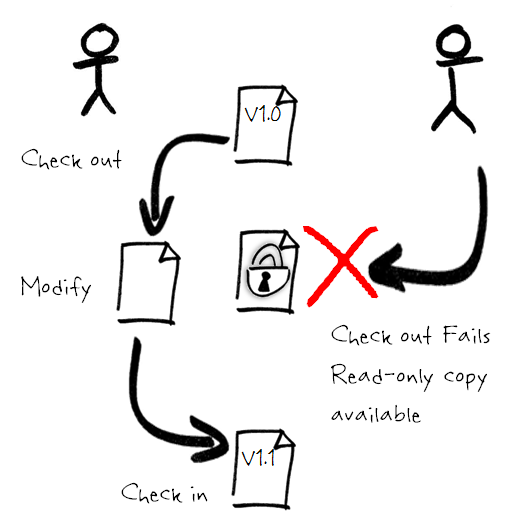
To ensure integrity of artefact revisions access control is required. Typically this involves locking the file against changes.

Acquiring the lock is referred to as Checking Out.

Committing the change (releasing the lock) is referred to as Checking In.

There are two common methods for achieving access control: File locking and Revision Merging

File locking

In a file locking system only one developer has write access to the artefact (Figure 4). Other developers will have read-only access to the current (stored) version. The file is only available again once it is checked back in.

image

Figure 4 – File locking allows only one developer at a time to modify an artefact.

File locking avoids complex merges due to large-scale changes since only one developer has access to the file and the ‘merges’ are essentially the new changes made by the developer.

Because a file may be checked out for a significant time developers may be tempted to simply circumvent the system

Revision Merging

Most systems allow multiple check-outs of the same file (see Figure 5).

If the file is checked-out multiple times the first developer to check-in always succeeds.

image

Figure 5 – Revision merging allows multiple check-outs on an object

Subsequent check-ins must merge their changes into the current revision. For simple merges this may be performed automatically by the RCS software. More complex merges may (and typically do) require human intervention.

Revision Control System Configurations

Revision control systems are designed to allow multiple users to access and modify artefacts from any location, either locally or across a network. There are two basic configurations of RCS – centralised and distributed. Each has its own merits; and the choice of RCS depends on the type of project being developed.

Centralised database systems

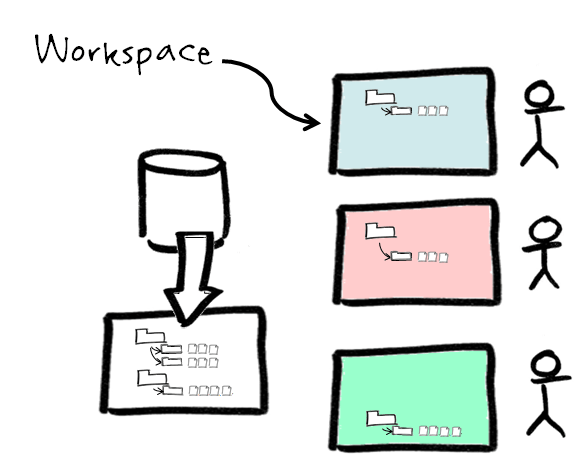
In a centralised system there is one master reference copy of all artefacts (Figure 6). Clients access the artefacts by making copies of a subset of central archive. This subset is a ‘view’ on the repository known as a Workspace. The workspace acts as an additional form of access control. The client is free to modify any artefact within their workspace, but may not modify anything not in their workspace (in fact, it should not be visible to them). Workspaces allow CM Managers to restrict access of staff to only the artefacts that are relevant to them.

image

Figure 6 – In a centralised system clients view a subset of the central repository

Centralised systems are best suited to geographically-close, commercial development projects, keeping all the company’s artefacts (which comprise their intellectual property) in a central location (for ease of back-up, etc.).

Distributed database systems

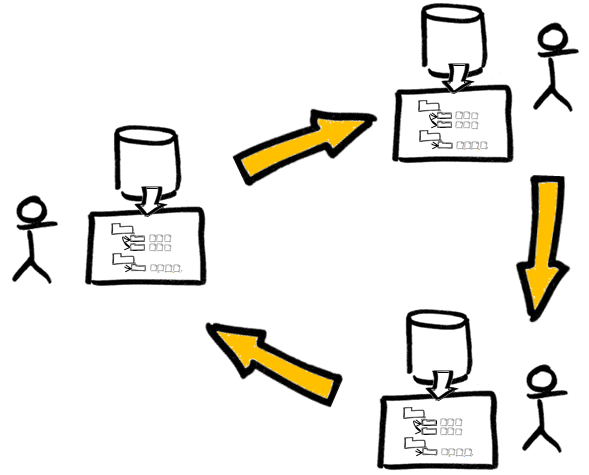
In a distributed system each client’s workspace is a bona fide repository. Each client has a full copy of the archive, complete with all revisions (Figure 7). The client is free to modify the database as they see fit.

image

Figure 7 – Multiple versions of the archive exist in a distributed system

Copies of the archives are kept synchronised with periodic updates (known as patches) sent between each of the RCSs.

Distributed database systems are widely used for open source software development. They are well suited to developments that may be geographically distant and being modify according to widely differing requirements.

Posted in Design Issues | Tagged , , , , , | 2 Comments

What is Configuration Management? And why is it important to me?

What is Configuration Management?

Configuration Management has its roots in the US Department of Defence in the 1950’s. It started as a technical management discipline and has been widely adopted by many other engineering disciplines, including Systems Engineering and Software Engineering. Configuration Management focuses on establishing, and maintaining, the consistency of a system or product throughout its lifetime. CM is a collection of competencies, techniques and tools whose purpose is to ensure the consistency of the system’s requirements, functional attributes and physical properties.

For the purposes of this paper we shall consider four fundamental, inter-related activities:

image

Revision Control

Revision control is concerned with controlling access to project artefacts and maintaining a history of changes to each artefact.

Configuration Identification

Before you can control any artefact you must identify what it is, what information it is going to contain and how it will be controlled.

Change Management

When an artefact has to change, Change Management controls when, or even if, the changes may be performed.

Release Management

Release Management focuses on the delivery of software outside the development department.

These activities are inter-related and highly dependent on each other.


Why perform CM?

Good Configuration Management ensures that the current design and build state of the system is known and recorded; and doesn’t rely on the tacit knowledge of the development team.

Being about to access an accurate historical record of system development is very useful – not only for project management and audit purposes, but for development activities such as debugging (for example, knowing what has changed between one set of tests and the next to help identify what could possibly be causing a fault).

Effective use of CM tools enables engineers to formally (and safely) record all change details. In particular, not only what was changed in the product but why it was changed

CM ensures that documentation can be produced which truly describes delivered systems.

Sometimes, it is necessary to rebuild old versions of products to reproduces problems for customers, such as the military, haven’t upgraded their tools to the latest versions.

Finally, and not to be overlooked (since these things happen!) good CM practices enable a system to be rebuilt correctly in the event of mistakes, failures and catastrophes.


Getting CM wrong

Configuration management can seem an awful lot of effort, much of which appears to be an overhead on the development of software. However, getting CM wrong can lead to the following:

– The wrong requirements being accepted

– The wrong design being implemented

– The wrong tools being used for development

– The wrong software being tested

– The wrong test suite being used

– The wrong version of software being released

Any of these could lead to huge amounts of wasted effort, wasted money, late deliveries and seriously dissatisfied customers. It doesn’t matter how good the software is, delivering the wrong product is never going to win you any plaudits.

Posted in General | 3 Comments

Fundamentals of Configuration Management

Configuration Management (CM) is a core process in any development activity. Software engineers realise this more than any other discipline, but for many software teams using Subversion as a source code repository is as far as they get. Configuration Management is a lot more than this.

These articles introduce the fundamental concepts of Configuration Management and what they mean to the development team. Revision control is the most well known and understood CM activity but few extend this to develop artefact change policies; and even fewer develop comprehensive review policies.

Change Management is the key to controlling your software development. Without Change Management projects rely on heroic efforts and (often!) blind luck to deliver.

I’ll introduce a new set of patterns to control branching within a source control system. Coupled with effective Change Management these patterns can save many hours of effort in maintaining the source control repository (a common problem in large repositories)

What is Configuration Management?

Revision Control basics

Defining your Configuration Items

Baselines and Branching

Change Management

Releasing Code

Posted in Design Issues | Tagged , , , , , , , , , | Leave a comment

GNU, and void pointers

Void pointers were introduced in ANSI C as ‘generic’ pointers; or, if you prefer, ‘pointers to no particular type’. They were designed to replace unsigned char* pointers in instances where the type of the object being pointed to could change.

unsigned char* has the least restrictive alignment – it aligns on a byte boundary. This means an unsigned char* pointer could be used to point to any object (with an appropriate cast, of course).

Remember, though, the type of a pointer defines how to interpret the memory at the address held in the pointer. Using an unsigned char* to point to any object is a bit of an abuse of such a pointer (unless, of course, the thing you’re referencing actually IS an unsigned char!)

Hence, the introduction of the void* – a pointer that imposes no requirements on the memory it references.

The void pointer has the same alignment as an unsigned char*; that is, void pointers align on byte boundaries.

Because void pointers are generic (and are effectively useless on their own) you can implicitly convert any pointer to and from a void*.

There is one little wrinkle with void pointers: you cannot perform (pointer) arithmetic on them. The following code fails to compile:

int main (void)
{
  int i;
  void *p = &i;
  p++;  /* But what’s the sizeof(void)?! */ 
}

When you increment (or perform any other arithmetic) on a pointer it modifies the value of the pointer by the size of the type it references.

In the case of a void pointer it doesn’t point to any type, so the compiler cannot know how to manipulate the pointer value.

Except, it seems, in the GNU compiler.

The above code will compile with no errors or warnings. GNU have included an extension that treats void* just like unsigned char*. So with a GNU compiler the value of p would increase by one. We can only assume that, since a void* has the same alignment as an unsigned char*, GNU thought its arithmetic should work the same way, too.

This code is highly unportable (and not even standards compliant). If you’re using little tricks like this in your everyday code be prepared for a painful life when you port to another compiler.

Posted in C/C++ Programming | Tagged , , , | 1 Comment

Inheritance, ABCs and Polymorphism

Virtual functions

Virtual functions in C++ exist to maintain the consistent behaviour of polymorphism when accessing derived objects via base class pointers. (If that statement has made your head spin, I’d suggest reading this article before carrying on)

class Base
{
public:
  virtual void v_op();
};

class Derived : public Base
{
public:
  virtual void v_op();
}

I can access either a Base object or a Derived object via a Base pointer; and I should get the appropriate behaviour for the actual type of the object I’m pointed at:

Base* pB;
pB = new Base;	  // Point at Base object…
pB->v_op(); 	  // calls Base::v_op()
pB = new Derived  // Derived object is also a Base object
pB->v_op()	  // this time calls Derived::v_op()

This mechanism is known as dynamic polymorphism.
Dynamic polymorphism is a very powerful mechanism for building flexible, maintainable solutions. If we base the client code not on a particular object but on a more abstract (in the design sense) super class (something known as the Dependency Inversion Principle) we can swap implementations in and out without having to re-factor the client code (using a principle called Substitutability).

Abstract Base Classes

Let’s take a common design problem. During design we identify a set of classes with some similar behaviour but some unique behaviour. For example, our design may require concurrent behaviour so we define a set of ‘active’ classes, each one doing a different task:

class ActiveComms
{
public:
  void start();    // Create a thread; and call doStuff()
  void doStuff();  // Perform this class’ behaviour
};

class ActiveDisplay
{
public:
  void start();    // Create a thread; and call doStuff()
  void doStuff();  // Perform this class’ behaviour
};

class ActiveControl
{
public:
  void start();    // Create a thread; and call doStuff()
  void doStuff();  // Perform this class’ behaviour
};

These objects share common behaviour – they all have to create and manage a thread of control in the underlying OS – but they all have (at least one) unique behaviour – the actual work they are doing (for example, managing the display)
Rather than replicating the common code it is put into a base class and the ‘working’ classes inherit from it. We make the unique behaviour virtual so that derived classes can provide their own (overridden) implementation.

class Active
{
public:
  void start();            // Create a thread; ; and call doStuff()
  virtual void doStuff();  // What should this function do?
};

class ActiveComms : public Active
{
  virtual void doStuff();  // ActiveComm’s unique behaviour
};

In the client code we can use dynamic polymorphism to decouple us from any particular implementation:

Active* pActiveObject;
pActiveObject = new ActiveComms;   // Derived class
pActiveObject->start(); 	   // Assume start() calls
                                   // polymorphic doStuff()

What’s to stop us creating a base class object, though?

Active* pActiveObject;
pActiveObject = new Active;        // Base class object.  Correct, but…
pActiveObject->start(); 	   // what happens here?

What happens when the base class object runs? What does its doStuff() function do? At best it may do some generic (common) behaviour; at worst nothing at all.
In reality we don’t want clients to create objects of the common base type. They’re a convenience to improve intrinsic quality, not really part of the functional behaviour. In order to inhibit creation of base class objects we make the virtual function pure.

class Active
{
public:
  void start();                // As before
  virtual void doStuff() = 0;  // Pure virtual function.
};

Active is now referred to as an Abstract class. You cannot create an instance of an abstract class. This is because a pure virtual function does not require an implementation. (We’ll talk about what happens if you try and call this base class function in a while). Derived classes must implement the doStuff() function; they then become what are called Concrete classes.

// Active* pActiveObject = new Active     // Fails – Active is abstract
Active* pActiveObject = new ActiveComms;  // Concrete class
pActiveObject->start();

What happens if a derived class calls the base class’ (pure) virtual fuction? C++ scope operator (::) allows you to call a function outside your current scope; and in fact anywhere in the class hierarchy.

// Class declarations as before.
void ActiveComms::doStuff() 	// virtual function
{
  // Do ActiveComms unique behaviour…
  Active::doStuff();            // Call base class’ (pure) virtual function.
                                // This is legal, but what happens?!
}

What happens when you write code like this depends on your compiler. On most modern compilers – for example GCC, IAR or even Microsoft! – you will get a Linker error when you compile this code. This is because there is no implementation for the pure virtual function (as expected).
Be careful, though: on some older compilers declaring a function as a pure virtual may cause the compiler to insert a null (zero) into the vtable for the class. The code compiles and links with no errors or warnings. When the code executes and the pure virtual function is called (via the vtable) it will execute a null pointer. On many processors this is the reset vector; meaning your call to the base class pure virtual function will reset your system (with no warning!)

Pure Virtual Functions with Implementations

So, can you provide an implementation for a pure virtual function? And why would I want to?
In our example, let’s assume there is some common behaviour that all our concrete classes have to perform as part of their doStuff() function. It makes sense to collect the common behaviour together in the base class – but, we still don’t want clients to create instances of the base class, Active.
Remember, adding (at least one) pure virtual functions to a class makes it an abstract class, meaning you cannot create an instance of it. A pure virtual class is not required to have an implementation – but that doesn’t mean you can’t provide an implementation.
The solution to our problem is to keep the Active class exactly as before but add an implementation to its doStuff() pure virtual function that contains all the common behaviour. This common behaviour can be called from the overridden derived classes’ doStuff() function:

class Active
{
public:
  void start();                // As before
  virtual void doStuff() = 0;  // Pure virtual function.
};

void Active::doStuff()		// Pure virtual function implementation!
{
  // Common behaviour goes in here.
}

class ActiveComms : public Active
{
  virtual void doStuff();  // ActiveComm’s unique behaviour
};

void ActiveComms::doStuff() 	// virtual function
{
  // Call base class’ (pure) virtual function.
  // Contains all the common behaviour.
  //
  Active::doStuff();       

  // Do ActiveComm's unique behaviour…
}

The design and use of pure virtual functions is two-fold:

  • To create abstract classes which acts as a common interface (or contract) to client code. Derived concrete classes can be substituted for the abstract base class (using dynamic polymorphism). The abstract base class designer must specify the (only) set of services the client can expect.
  • To force derived classes to provide their own implementation of the function. The abstract base class designer must specify which parts of the implementation can be shared and which must be unique.

Use of abstract base classes and substitution, using pure virtual functions and dynamic polymorphism allows you to build flexible and adaptable solutions, particularly in areas of your system that will be subject to change over the life of the system.

Posted in C/C++ Programming | Tagged , , , , , , | Leave a comment

The Baker’s Dozen of Use Cases

Use cases have become a core part of the requirements analyst’s arsenal.  Used well they can bring dramatic increases in customer satisfaction and a whole host of other subtle benefits to software development.

The use case itself is very simple in concept: describe the functionality of the system in terms of interactions between the system and its external interactors.  The focus of the use case is system usage,  from an external perspective.

Despite this apparent simplicity, requirements analysts frequently struggle to write coherent, consistent use cases that can be used to facilitate development.   Often, the use case analysis becomes an exercise in confusion, incomprehension and the dreaded ‘analysis paralysis’.

This article aims to aid use case writers by presenting a set of rules to follow when performing use case analysis.  The rules are designed to avoid common pitfalls in the analysis process and lead to a much more coherent set of requirements.

A brief introduction to use cases

The Baker’s Dozen ‘rules’:

Rule 1: Use cases aren’t silver bullets

Rule 2: Understand your stakeholders

Rule 3: Never mix your actors

Rule 4: The "Famous Five" of requirements modelling

Rule 5: Focus on goals, not behaviour

Rule 6: If it’s not on the Context or Domain models, you can’t talk about it

Rule 7: Describe ALL the transactions

Rule 8: Don’t describe the user interface

Rule 9: Build yourself a data dictionary

Rule 10: The magical number seven (plus or minus two)

Rule 11: Don’t abuse <<include>>

Rule 12: Avoid variations on a theme

Rule 13: Say it with more than words


These 13 guidelines are by no means exhaustive (for example, what about ‘Abstract’ actors; or System Integrity use cases?) and I’m sure there are dozens more I could add to the list (by all means, let me know your golden rules)  The aim of writing this article was to give beginners to use case modelling a simple framework for creating useful, effective use cases – something I think is sorely missing.

The Baker’s Dozen can be (neatly) summed up by the following principles:

  • Understand the difference between analysis and design.
  • Understand the value of a model – know why to create the model, not just how.
  • Understand the difference between precision and detail.
  • Keep it simple; but never simplistic

Next>>

Posted in Design Issues | Tagged , , , , | 2 Comments

The Baker’s Dozen of Use Cases

Rule 13: Say it with more than words

Use case descriptions are most commonly written in text format (albeit often a stylised, semi-formal style of writing). Text is a very effective method of describing the transactional behaviour of use cases – it’s readily understandable without special training; most engineers can produce it (although the ability to write basic prose does seem beyond the capability of many!); and it is flexible enough to deal with complex behaviours – for example, variable numbers of iterations through a loop – without becoming cumbersome.


image

Use the most appropriate notation for the behaviour you are describing


However, this flexibility can come at the price of precision. Sometimes, for example in many control systems, you have to state precisely what the response of the system will be. Words, in this case, are not adequate (that said, I have seen requirements engineers attempt to describe the overshoot behaviour of a closed loop control system in English prose!)

This rule therefore should be: find the most appropriate notation to describe the transactions between the actors and the system; with a corollary that sometimes the right notation is multiple notations. Use tables, charts, diagrams, activity diagrams, flowcharts, mathematical models, state charts, or combinations of these, to describe the behaviour. Don’t get caught up in the dogma of use cases that says the use case description must be text. For most systems I have found that combinations of methods work best – some transactions are best described using semi-formal text; some by state machines; others by tables. The skill is recognising the type of transactions you are describing and picking the appropriate method.


<<Prev     Home>>

Posted in Design Issues | Tagged , , , , , | 1 Comment

The Baker’s Dozen of Use Cases

Rule 12: Avoid variations on a theme

A common affliction amongst novice use case modellers (particularly those from a development background) is the desire to fettle the use case model – to organise it, revise it, balance it; and generally make it look more like a design model.  Unfortunately, beyond a certain point this effort actually starts to degrade the utility and effectiveness of the model.  More and more effort is put into a model that becomes less and less useful to the customer and the analyst.

This all-too-common situation is known as ‘Analysis Paralysis’.

I always advise, unless you can provide a really compelling reason to do otherwise avoid associations between use cases.  Yes, you might have a less optimal model, but at least your stakeholders will find it easy (or easier) to follow.  This is price you always pay with use case associations: Elegant but complicated to understand, versus sub-optimal but explicit.  In my view explicit always wins; after all, we’re trying to understand the problem, not design a solution.

Case in point:  Use case specialisation.

In UML a use case (and indeed an actor) is a special form of classifier. One of the properties of classifiers is that they can be specialised – that is, a new classifier may be defined that has the properties and behaviours of the parent, but may extend or modify these attributes. The definition of the specialised classifier is that it is also a the type of its parent – that is, all instances of the specialised classifier form a subset of the set of parent classifiers.


image

Use case and actor specialisation

In use case terms it means we can define actors or use cases that represent specialisations of some base behaviour.  As part of our analysis we may choose to define actors whose goals form a superset of another actor’s. For example, we could define an Administrator actor as a specialisation of a User actor. The Administrator performs all the functions of the User but has additional behaviours (admin tasks)

Actor specialisation is avoidable if you consider actors as roles. A role is just a set of competencies and behaviours that can be adopted by a person (when interacting with the system). So, when I perform everyday tasks I adopt the role of a User actor; when I need to do an administrative task I adopt the role of an Administrator (if I’m able) This model also means I can be an Administrator without being a User – something the specialisation model doesn’t allow.

For use cases the problem becomes more complex. Given any particular use case, what does it mean to specialise it?  A specialised use case is like a base use case, but may have different behaviour. This complication is adding nothing to our comprehension of the system (in fact, possibly the opposite!).  Not to mention the pain you will go through trying to explain all this to your customers!

The Liskow Substitutabiliy Principle (LSP) can help with this situation.  In simple terms the LSP says that a derived class can be substituted for a base class object if, and only if, the derived class has no stronger pre-conditions (demands no more of the client) and has no weaker post-conditions (delivers no less). 

For use cases, this means the specialised use case must have the same pre-conditions as the super use case (or possibly weaker).  The specialised use case may override super use case functionality (whatever that actually implies!).  Finally, none of the scenarios in the specialised use case must result in weaker post-conditions than the super use case. 

This could be achieved by having a super use case with limited (or no) behaviour, strong pre-conditions and very weak post-conditions.

However, one could reasonably argue this super use case becomes little more than a generic place-holder and doesn’t really add much to our understanding of the system’s (transactional) behaviour.

Use case specialisation can be avoided very simply by forking the use case with an optional flow. For one variation take one path through the use case; for another variation take the other. Unfortunately, this causes the use case to become more complicated; but at the benefit of explicitness.

There are some rare cases where use case specialisation can be more explicit but these are more the exception than the rule.


<<Prev     Next>>

Posted in Design Issues | Tagged , , , , , , , , | 1 Comment