The changing face of programming abstraction in C++

Iterating through containers… options, options options.

Iterating through a container of objects is something we do a lot.  It’s boilerplate code.  It’s also a nice indicator of how C++ is raising the level of abstraction in programming.

So let’s start with a simple container of ADTs:

image

Now let’s iterate through them, calling the mf() method on each object in turn.  First, we’ll ‘roll our own’ loop.

image

That’s imperative programming in action; and has the warm, fuzzy feeling of recognition for all C programmers.

Modern C++, however, favours a more declarative style of programming (even though, under the hood, it’s all imperative!)  Typically, you’d use an algorithm to declare what you want to happen (in this case, iterate across a range of objects in a container, doing ‘something’ to each one) rather than how:

image

This is certainly more abstract, but I’m not sure it’s much more readable (am I the only person who feels the member function adapters are named the wrong way round?)

A brief look at the code for for_each reveals that it pretty much does what your hand-rolled code would do.

With the release of C++11 we have new options available to us.  First up is the lambda:

image

The syntax for lambdas tends to provoke upset in more-sensitive souls but once you’re used to it the algorithms become quite elegant: I define what I want to happen exactly at the point I need it.  Now I’m specifying what I want to achieve, and how I want to achieve it all in one one lovely confection of declarative and imperative code!

Finally, in a random act of good sense the C++ committee realised that iterating through containers is such a common thing to do it should be added to the language rather than being relegated to a library function – just like in other modern programming languages:

image

The range-for statement provides a single (compound) statement solution to accessing each element of a container.  And it works with all the standard containers – even good ol’ fashioned arrays.

But surely, such an abstract statement will be woefully inefficient; or put another way: “it can’t possibly be as efficient as my hand-rolled loop”.  I did a quick comparison:

image

Hand-rolled loop:

  • 35 lines of assembler, including:
  • 8 function calls
    • std::vector<T>::begin
    • std::vector<T>::end
    • std::vector<T>::iterator::operator ++
    • std::vector<T>::iterator::operator !=
    • std::vector<T>::iterator::operator –>
    • std::vector<T>::iterator::~iterator (called in two places)
    • The member function call

Range-for statement:

  • 34 lines of assembler, including:
  • 8 function calls:
    • std::vector<T>::begin()
    • std::vector<T>::end()
    • std::vector<T>::iterator::operator ++
    • std::vector<T>::iterator::operator !=
    • std::vector<T>::iterator::operator *
    • std::vector<T>::iterator::~iterator (called in two places)
    • The member function call.

So, to all practical intents and purposes the code is the same.  So, with C++11 there really is no compelling reason for rolling your own iteration loops.

Posted in C/C++ Programming | Tagged , , , , , | 1 Comment

Embedded System Conference – India


This year I have honour of being invited to present at the Embedded Systems Conference in Bengaluru (Bangalore), India. Based on previous visits these classes are very well attended and always generate a lot of post-class discussions.

This year I’ve extended my previous 1/2 day class to a full day titled “Programming in C for the ARM Cortex-M Microcontroller”. Having a full day allows me to delve in too much greater detail. The class is broken down in to four subsections:

  • Cortex-M Architecture
  • C Programming and the Cortex-M
  • CMSIS (including CMSIS-RTOS)
  • Debug (including CoreSight)

An overview is covered here.

The other class is one I have presented at ESC in the US before but not in India; Understanding Mutual Exclusion: The Semaphores vs. the Mutex. This presentation is based around much of the material in some of my previous postings (see RTOS related blog postings ). I still find this class really interesting. In general, whenever you bring up the mutex/semaphore discussion most people jump to a per-conceived idea that they know the differences; by the end of this class most understand that their mental model was incorrect.

If anyone is attending then please come and say hello.

Posted in ARM, CMSIS, Cortex, General | Tagged , , , | Leave a comment

Creating a Linux Live USB Thumbstick (The Hard Way)

Introduction

So recently I needed to create a live system and I had a spare 8 GB USB drive on which to do it.

Looking around the net there’s a lot of solutions to doing this but I needed something that would be independent of the host distribution – I used Fedora 17 in this instance but it might not be in the future – and would work quickly and easily.

This article seeks to document what I did in order to accomplish this – whether it could be done better is for you to sort out in the comments!

Getting Started

You will need the CD ISO of the distribution you want to use (I used Ubuntu 10.04.4 LTS) and an inserted but unmounted thumb drive.

1. Using the Disk Utility, partition the disk such that the first partition is as big as it can be – minus 750MB – set it as bootable and format it as Fat (FAT32 LBA)

2. Create an additional partition of unformatted space up until the end of the drive to take up the 750MB.

3. Mount the first partition from the command prompt, note my device came up as /dev/sdc, yours may differ:

sudo mount /dev/sdc1 /mnt

4. Install grub2 onto the windows partition. You will need to have this package installed (either yum install grub2 on Fedora or sudo apt-get install grub2 on a Debian/Ubuntu system).

sudo grub2-install --no-floppy --root-directory=/mnt /dev/sdc

5. Copy over the kernel and initrd (initial RAM disk) over from the ISO. To do this I double clicked the ISO, let it automount, grabbed the files vmlinuz and initrd.lz from /casper/ and copied them over to my home directory. I then copied them to the drive.

sudo cp ~/{vmlinux,initrd.lz} /mnt/boot/

6. Create a file to be used as the persistent file-system – I have chosen to create mine as 2GB here but you can choose whatever you like bearing in mind you can’t have a file larger than 4GB on a FAT32 partition.

sudo dd if=/dev/zero of=/mnt/casper-rw bs=1M count=2048

7. Format the persistent filesystem file

sudo mkfs.ext4 -F /mnt/casper-rw

8. Write your Linux ISO to the second partition

sudo dd if=~/ubuntu-10.04.4-desktop-i386.iso of=/dev/sdc2

9. Create a grub2 boot menu

Create/Open up the file /mnt/boot/grub2/grub.conf in your favourite editor and make it look like this:

set default=0
set timeout=10
menuentry “Ubuntu Live” {
set root=(hd0,1)
linux /boot/vmlinuz boot=casper file=/preseed/ubuntu.seed persistent rw noprompt noeject
initrd /boot/initrd.lz
}

10. Unmount and sync the drive

sudo umount /mnt
sudo sync

11. Reboot your system (safely!)

12. Choose the correct option to boot from USB and enjoy your new Linux environment.

And that’s it. You now have a USB live CD that should allow you to create live environments for a wide variety of distros whilst also  requiring no disto specifics tools.


Nb. As a former Ubuntu guy I was really chuffed to find out about the command ‘yum provides <binary|file>’ which causes yum to go off and find a package that provides that a file by that name for example:

[nick@slimtop ~]$ yum provides grub2-install
Loaded plugins: downloadonly, langpacks, presto, refresh-packagekit
1:grub2-2.0-0.25.beta4.fc17.i686 : Bootloader with support for Linux, Multiboot and more
Repo        : fedora
Matched from:
Filename    : /usr/sbin/grub2-install

Very cool – on Debian you can install the apt-file package which will let you accomplish the same thing.

Posted in General | Tagged , , | Leave a comment

The C build process

In this article we look at the C build process – that is, how we get from C source files to executable code, programmed on the target.  It wasn’t so long ago this was common knowledge (the halcyon days of the hand-crafted make file!) but modern IDEs are making this knowledge ever-more arcane.

Compilation

The first stage of the build process is compilation.
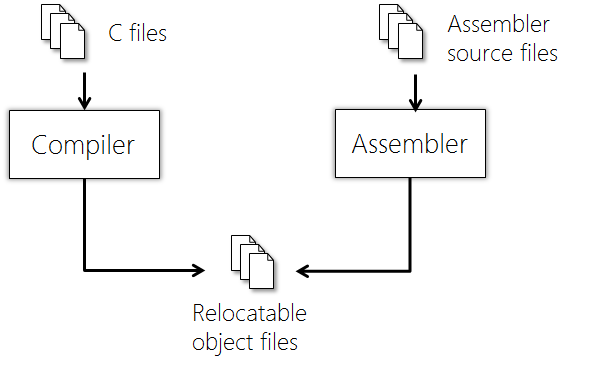
image

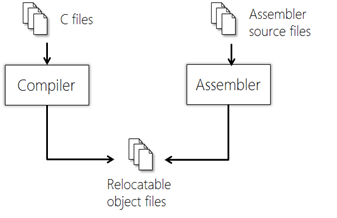
The compiler is responsible for allocating memory for definitions (static and automatic) and generating opcodes from program statements. A relocatable object file (.o) is produced.  The assembler also produces .o files from assembly-language source.

The compiler works with one translation unit at a time.  A translation unit is a .c file that has passed through the pre-processor.

The compiler and assembler create relocatable object files (.o)

A Librarian facility may be used to take the object files and combine them into a library file.

Compilation stages

Compilation is a multi-stage process; each stage working with the output of the previous.  The Compiler itself is normally broken down into three parts:

  • The front end, responsible for parsing the source code
  • The middle end, responsible for optimisation
  • The back end, responsible for code generation

Front End Processing:

Pre-processing

The pre-processor parses the source code file and evaluates pre-processor directives (starting with a #) – for example #define.  A typical function of the pre-processor is to#include function / type declarations from header files.  The input to the pre-processor is known as a pre-processed translation unit; the output from the pre-processor is a post-processed translation unit.

Whitespace removal

C ignores whitespace so the first stage of processing the translation unit is to strip out all whitespace.

Tokenising

A C program is made up of tokens.  A token may be

  • a keyword (for example ‘while’)
  • an operator (for example, ‘*’)
  • an identifier; a variable name
  • a literal (for example, 10 or “my string”)
  • a comment (which is discarded at this point)

Syntax analysis

Syntax analysis ensures that tokens are organised in the correct way, according to the rules of the language.  If not, the compiler will produce a syntax error at this point.  The output of syntax analysis is a data structure known as a parse tree.

Intermediate Representation

The output from the compiler front end is a functionally equivalent program expressed in some machine-independent form known as an Intermediate Representation (IR).  The IR program is generated from the parse tree.

IR allows the compiler vendor to support multiple different languages (for example C and C++) on multiple targets without having n * m combinations of toolchain.

There are several IRs in use, for example Gimple, used by GCC.  IRs are typically in the form of an Abstract Syntax Tree (AST) or pseudo-code.

Middle End Processing:

Semantic analysis

Semantic analysis adds further semantic information to the IR AST and performs checks on the logical structure of the program.  The type and amount of semantic analysis performed varies from compiler to compiler but most modern compilers are able to detect potential problems such as unused variables, uninitialized variables,  etc.  Any problems found at this stage are normally presented as warnings, rather than errors.

It is normally at this stage the program symbol table is constructed, and any debug information inserted.

Optimisation

Optimisation transforms the code into a functionally-equivalent, but smaller or faster form.  Optimisation is usually a multi-level process.  Common optimisations include inline expansion of functions, dead code removal, loop unrolling, register allocation, etc.

Back End Processing:

Code generation

Code generation converts the optimised IR code structure into native opcodes for the target platform.

Memory allocation

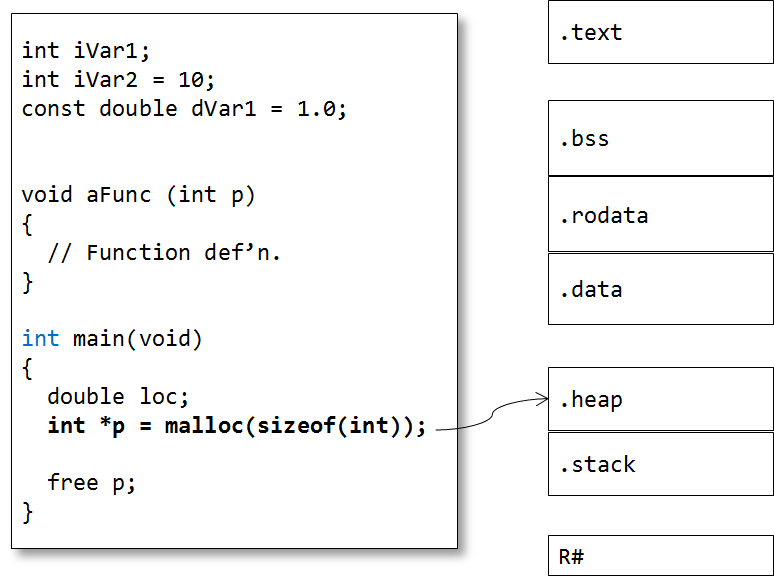
The C compiler allocates memory for code and data in Sections.  Each section contains a different type of information.  Sections may be identified by name and/or with attributes that identify the type of information contained within.  This attribute information is used by the Linker for locating sections in memory (see later).

Code

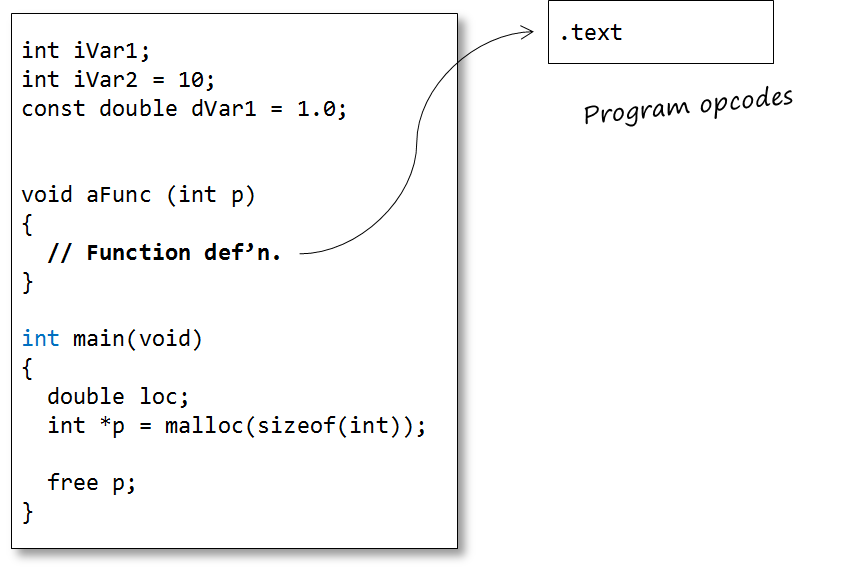
Opcodes generated by the compiler are stored in their own memory section, typically known as .code or  .text

image

Static data

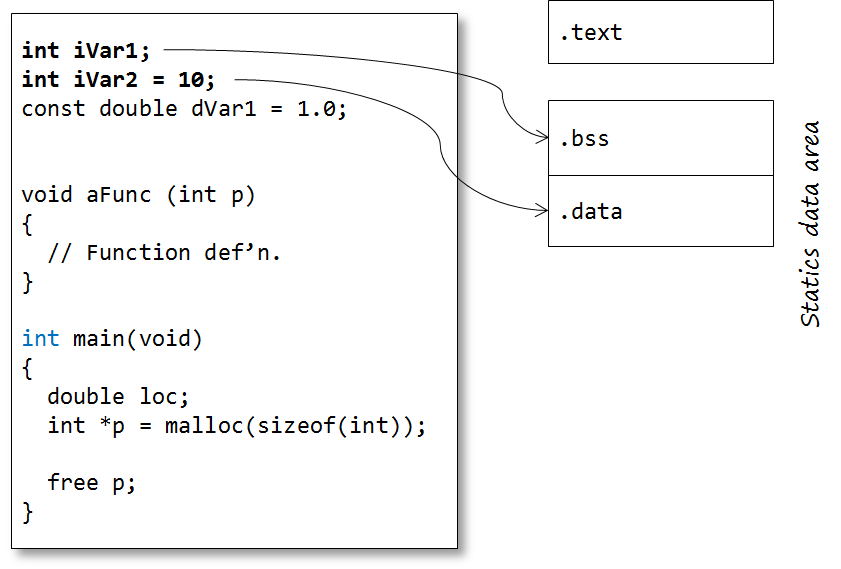
The static data region is actually subdivided into two further sections:

  • one for uninitialized-definitions (int iVar1;).
  • one for initialised-definitions (int iVar2 = 10;)

So it would not be unexpected for the address of iVar1 and iVar2 to not be adjacent to each other in memory.

The uninitialized-definitions’ section is commonly known as the .bss or ZI section. The initialised-definitions’ section is commonly known as the .data or RW section.

image

Constants

Constants may come in two forms:

  • User-defined constant objects (for example const int c;)
  • Literals (‘magic numbers’, macro definitions or strings)

The traditional C model places user-defined const objects in the .data section, along with non-const statics (so they may not be truly constant – this is why C disallows using constant integers to initialise arrays, for example)

Literals are commonly placed in the .text / .code section.  Most compilers will optimise numeric literals away and use their values directly where possible.

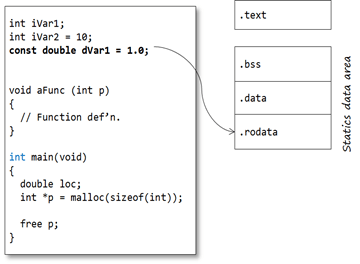
Many modern C toolchains support a separate .const / .rodata section specifically for constant values.  This section can be placed (in ROM) separate from the .data section.  Strictly, this is a toolchain extension.
image


Automatic variables

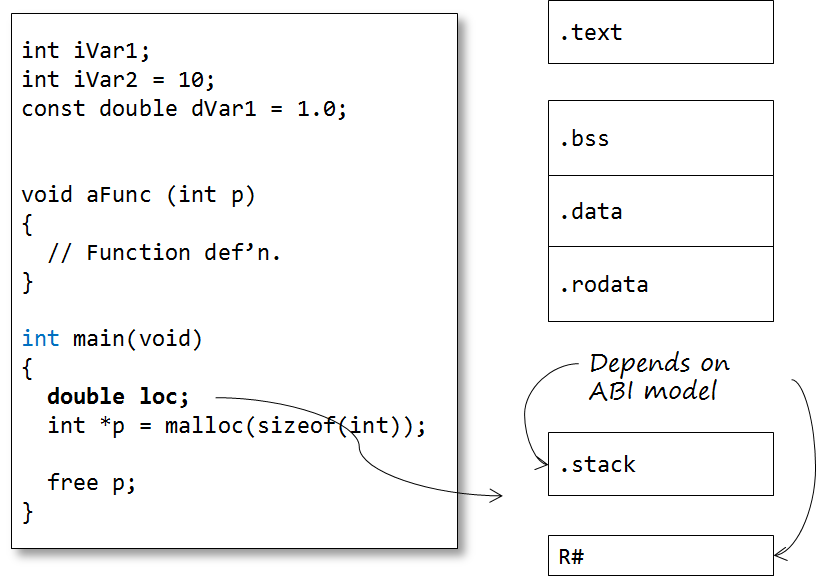
The majority of variables are defined within functions and classed as automatic variables. This also includes parameters and any temporary-returned-object (TRO) from a non-void function.
The default model in general programming is that the memory for these program objects is allocated from the stack. For parameters and TRO’s the memory is normally allocated by the calling function (by pushing values onto the stack), whereas for local objects, memory is allocated once the function is called. This key feature enables a function to call itself – recursion (though recursion is generally a bad idea in embedded programming as it may cause stack-overflow problems). In this model, automatic memory is reclaimed by popping the stack on function exit.

It is important to note that the compiler does NOT create a .stack segment.  Instead, opcodes are generated that access memory relative to some register, the Stack Pointer, which is configured at program start-up to point to the top of the stack segment (see below)

However, on most modern microcontrollers, especially 32-bit RISC architectures, automatics are stored in scratch registers, where possible, rather than the stack. For example the ARM Architecture Procedure Call Standard (AAPCS) defines which CPU registers are used for function call arguments into, and results from, a function and local variables.

image

Dynamic data

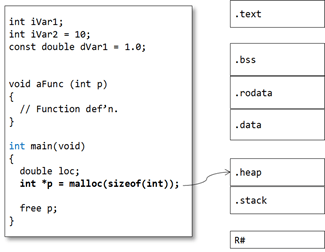
Memory for dynamic objects is allocated from a section known as the Heap.  As with the Stack, the Heap is not allocated by the compiler at compile time but by the Linker at link-time.
image

Object files

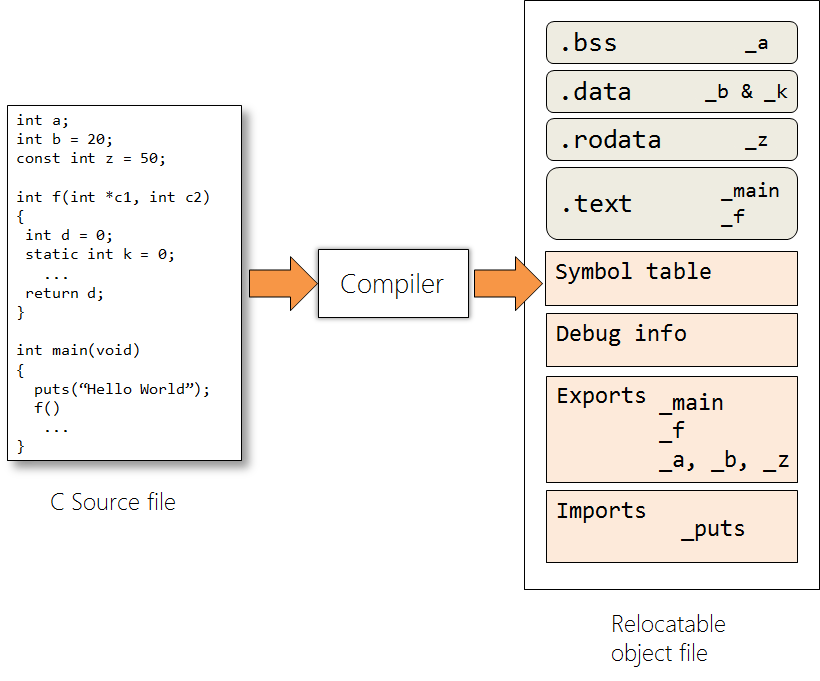
The compiler produces relocatable object files – .o files.
The object file contains the compiled source code – opcodes and data sections.  Note that the object file only contains the sections for static variables.  At this stage, section locations are not fixed.

The .o file is not (yet) executable because, although some items are set in concrete (for example: instruction opcodes, pc-relative addresses, “immediate” constants, etc.), static and global addresses are known only as offsets from the starts of their relevant sections. Also, addresses defined in other modules are not known at all, except by name.  The object file contains two tables –  Imports and Exports:

  • Exports contains any extern identifiers defined within this translation unit (so no statics!)
  • Imports contains any identifiers declared (and used) within the translation; but not defined within it.

Note the identifier names are in name-mangled form.

image

Linking

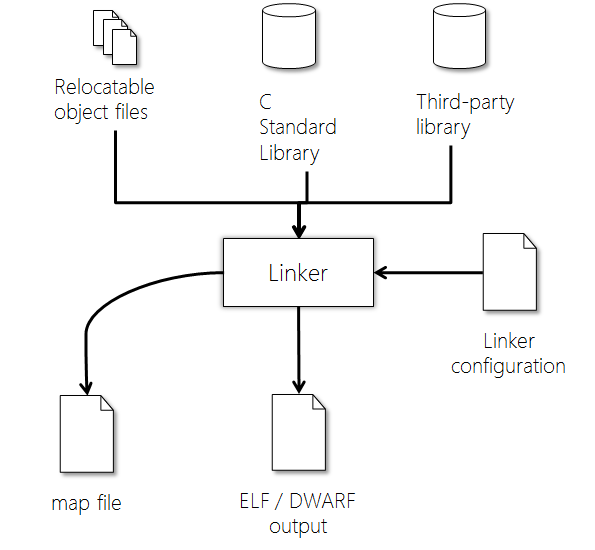
The Linker combines the (compiled) object files into a single executable program.  In order to do that it must perform a number of tasks.

image

Symbol resolution

The primary function of the Linker (from whence it derives its name) is to resolve references between object files – that is, to ensure each symbol defined by the program has a unique address.

If any references remain unresolved, all specified library/archive (.a) files are searched and the appropriate modules are gathered in order to resolve those references.  This is an iterative process.  If, after this, the Linker still cannot resolve a symbol it will report an ‘unresolved reference’ error.

Be careful, though: the C standard specifies that all external objects must have at least one definition in all object files.  This means that a compiler can assume that the same symbol defined in two translation units must refer to the same object!  Unlike C++, C does not strictly enforce a ‘One Definition Rule’ on global variables; although a ‘sensible’ toolchain probably should!

Section concatenation

The Linker then concatenates like-named sections from the input object files.
The combined sections (output sections) are usually given the same names as their input sections.  Program addresses are adjusted to take account of the concatenation.

Section location

To be executable code and data sections must be located at absolute addresses in memory.  Each section is given an absolute address in memory.  This can be done on a section-by-section basis but more commonly sections are concatenated from some base address.  Normally there is one base address in non-volatile memory for persistent sections (for example code) and one address in volatile memory for non-persistent sections (for example the Stack).

Data initialisation

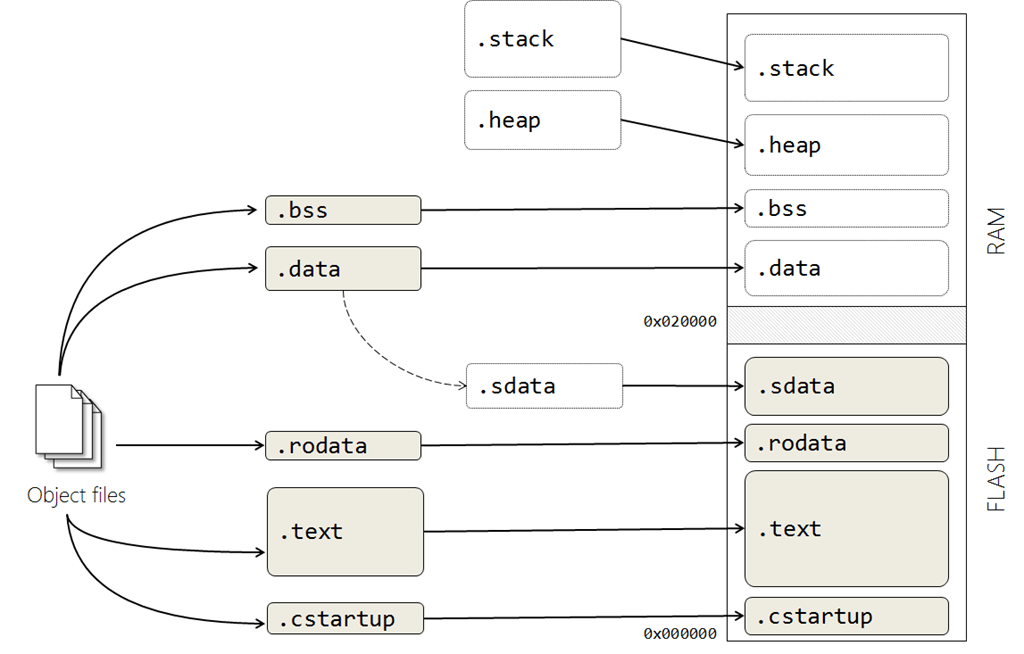
On an embedded system any initialised data must be stored in non-volatile memory (Flash / ROM).  On startup any non-const data must be copied to RAM.  It is also very common to copy read-only sections like code to RAM to speed up execution (not shown in this example).
In order to achieve this the Linker must create extra sections to enable copying from ROM to RAM. Each section that is to be initialized by copying is divided into two, one for the ROM part (the initialisation section) and one for the RAM part (the run-time location).  The initialisation section generated by the Linker is commonly called a shadow data section – .sdata in our example (although it may have other names).

If manual initialization is not used, the linker also arranges for the startup code to perform the initialization.

The .bss section is also located in RAM but does not have a shadow copy in ROM.  A shadow copy is unnecessary, since the .bss section contains only zeroes.  This section can be initialised algorithmically as part of the startup code.

Linker control

The detailed operation of the linker can be controlled by invocation (command-line) options or by a Linker Control File (LCF).

You may know this file by another name such as linker-script file, linker configuration file or even scatter-loading description file. The LCF file defines the physical memory layout (Flash/SRAM) and placement of the different program regions.  LCF syntax is highly compiler-dependent, so each will have its own format; although the role performed by the LCF is largely the same in all cases.

When an IDE is used, these options can usually be specified in a relatively friendly way.  The IDE then generates the necessary script and invocation options.

image

The most important thing to control is where the final memory sections are located.  The hardware memory layout must obviously be respected – for most processors, certain things must be in specific places.

Secondly, the LCF specifies the size and location of the Stack and Heap (if dynamic memory is used). It is common practice to locate the Stack and Heap with the Heap at the lower address in RAM and the Stack at a higher address to minimise the potential for the two areas overlapping (remember, the Heap grows up the memory and the Stack grows down) and corrupting each other at run-time.

The linker configuration file shown above leads to a fairly typical memory layout shown here.

  • .cstartup – the system boot code – is explicitly located at the start of Flash.
  • .text and .rodata are located in Flash, since they need to be persistent
  • .stack and .heap are located in RAM.
  • .bss is located in RAM in this case but is (probably) empty at this point.  It will be initialised to zero at start-up.
  • The .data section is located in RAM (for run-time) but its initialisation section, .sdata, is in ROM.

image


The Linker will perform checks to ensure that your code and data sections will fit into the designated regions of memory.

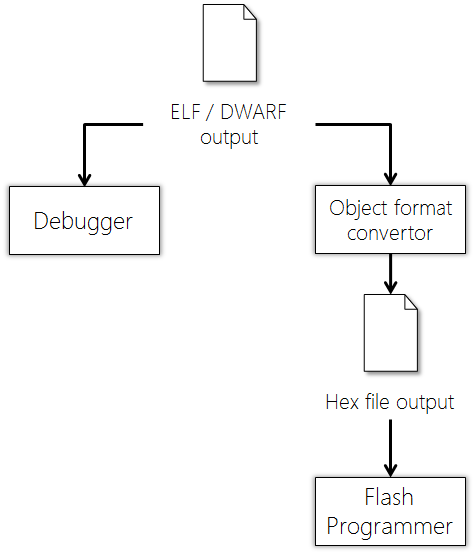
The output from the locating process is a load file in a platform-independent format, commonly .ELF or .DWARF (although there are many others)

The ELF file is also used by the debugger when performing source-code debugging.

Loading

ELF or DWARF are target-independent output file formats.  In order to be loaded onto the target the ELF file must be converted into a native flash / PROM format (typically, .bin or .hex)

image


Key points

  • The compiler produces opcodes and data allocation from source code files to produce an object file.
  • The compiler works on a single translation unit at a time.
  • The linker concatenates object files and library files to create a program
  • The linker is responsible for allocating stack and free store sections
  • The linker operation is controlled by a configuration file, unique to the target system.
  • Linked files must be translated to a target-dependent format for loading onto the target.
Posted in C/C++ Programming | Tagged , , , , , , , , , | 20 Comments

Can existing embedded applications benefit from Multicore Technology?

It feels that not a day goes by without a new announcement regarding a major development in multicore technology. With so much press surrounding multicore, you have to ask the question “Is it for me?” i.e. can I utilise multicore technology in my embedded application?

However, from a software developer’s perspective, all the code examples seem to demonstrate the (same) massive performance improvements to “rendering fractals” or “ray tracing programs”. The examples always refer to Amdahl’s Law, showing gains when using, say, 16- or 128-cores. This is all very interesting, but not what I would imagine most embedded developers would consider “embedded”.  These types of programs are sometimes referred to as “embarrassingly parallel” as it is so obvious they would benefit from parallel processing. In addition the examples use proprietary solutions, such as TBB from Intel, or language extensions with limited platform support, e.g. OpenMP. In addition, this area of parallelisation is being addressed more and more by using multicore General Purpose Graphics Processing Units (GPGPU), such as PowerVR from Imagination Technologies and Mali from ARM, using OpenCL; however this is getting off-topic.

So taking “fractals”, OpenMP and GPGPUs out of the equation, is multicore really useful for embedded systems? Continue reading

Posted in ARM, Cortex, Design Issues, General, Industry Analysis | Tagged , , , | 6 Comments

Adapter pattern memory models

Following on from the article on Adapter patterns (Read more here) I’ve decided to explore the memory models of each of these patterns.

We’ll start with the simple case of a UtilityProvider class being a simple class with no virtual methods. Then we’ll look at what happens when the UtilityProvider has virtual functions added.

To flesh out the memory models I’ve added (arbitrary) data to both the UtilityProvider class and its adapters.

These memory models are based on the IAR Embedded Workbench C++ compiler. It’s a fairly typical compiler for embedded systems development. For simplicity I’m ignoring padding issues; compilers will usually pad to the next word boundary, so assume what you see is word-aligned objects.
The Object Adapter

A quick reminder of the Object Adapter pattern. The ObjectAdapter class realises the IService interface and forwards on all calls to the encapsulated UtilityProvider object. The Utility provider object can be created by the client and passed in the adapter, allocated on the free store by the adapter, or stored as a nested (composite) object.

clip_image002

Figure 1 – The Object Adapter pattern

Object Adapter memory model

If the UtilityProvider is created outside the adapter (or on the free store) the memory model is as shown in Figure 2. Note the ObjectAdapter class has a vtable pointer since it implements the IService interface. The de-facto model is to place the vtable pointer as the first element in the class (in other words at ‘this’)

clip_image004

Figure 2 – ObjectAdapter with a reference to the UtilityProvider object

If the UtilityProvider object is a composite object the memory model changes (Figure 3). Note, the ObjectAdapter vtable pointer is still the first element in the object.

clip_image006

Figure 3 – ObjectAdapter with nested UtilityProvider

The Class Adapter pattern

A Class Adapter realises the client-required interface but privately inherits from the UtilityProivder class (hiding its methods) – See Figure 4

clip_image008

Figure 4 – The Class Adapter pattern

Class Adapter memory model

The memory model for inheritance in C++ constructs a base class object as part of the derived class, so we should expect a memory model similar to that of the composite-object Object Adapter. In fact, it is identical( Figure 5)

clip_image010

Figure 5 – Class Adapter

Adding virtual functions to the UtilityProvider.

Suppose our UtilityProvider class has virtual functions (for example Figure 6). How does this affect the memory model?

/////////////////////////////////////////////////////////////////////
//

class UtilityProvider
{
public:
  UtilityProvider();
  void func1();
  void func2();
  void func3();
  void func4();
  virtual void func5(); // Requires a vtable.

protected:
  void helperFunction();

private:
  // Private data.
};

Figure 6 – UtilityProvider with virtual functions

The Object Adapter memory model

When the UtilityProvider class has virtual functions it gets its own vtable and vtable pointer (Figure 7). It’s worth noting the order in which the memory is allocated depends on the order of declaration in the class definition. In this example I’ve put the UtilityProvider object as the first declaration; before any other data.

Note also that the ObjectAdapter’s vtable pointer is still the first element in the object.

clip_image012

Figure 7 – Object Adapter with virtual UtilityProvider

Class Adapter memory model

In a single-inheritance model the derived class shares its vtable pointer with the base class (that’s the basis of polymorphism. In the case of the Class Adapter model this isn’t the case. Both the ClassAdapter and UtilityProvider retain their own vtable pointers. (This allows the ClassAdapter to have a virtual function with the same signature as the UtilityProvider, and still call the UtilityProvider’s virtual function. If they shared the same vtable pointer you could end up with an infinite recursive call)

There is also a difference on memory layout depending on whether the IService interface is the Primary Base Class and the UtilityProvider is a Secondary Base Class( Figure 9); or vice versa (Figure 10)

You should always favour having the Interface as the Primary Base Class. For more information on why see this white paper.

/////////////////////////////////////////////////////////////////////
//
class ClassAdapter : public IService, // Primary Base Class
                     private UtilityProvider // Secondary Base Class
{
  // ....
};

/////////////////////////////////////////////////////////////////////
//
class ClassAdapter : private UtilityProvider, // Primary Base Class
                     public IService // Secondary Base Class
{
  // ....
};

Figure 8 – ClassAdapter definitions with different PBC and SBC

clip_image014

Figure 9 – ClassAdapter with IService as Primary Base Class

clip_image016

Figure 10 – ClassAdapter with UtilityProvider as Primary Base Class

Summary

The memory models of the Adapter patter are all very similar. Remember when programming these patterns the associated overheads:

  • Extra code space for the vtable(s)
  • An extra vtable pointer for each object with virtual functions
  • The overhead of virtual function calls (note the double overhead if you are calling a virtual function on the original class!)
Posted in C/C++ Programming | Tagged , , , , , | 1 Comment

Raspberry Pi – First Impressions and Raspbmc

The Pi Has Landed

It arrived. After quite some delay my Model B Raspberry Pi has arrived.

The Raspberry Pi is powered by the Broadcom BCM2835 SoC which includes an ARM1176JZF-S core running at 700Mhz, 256MB SDRAM and a Videocore 4 GPU which is capable of BluRay quality playback (H.264/MPEG-4 AVC at 40MBits/s) which puts it roughly on par with a 1st generation Xbox with slightly better graphics.

There are two models of Pi. The Model B which is ‘available’ at the moment comes with two USB ports, Ethernet connectivity and 256MB RAM and the lesser-equipped Model A which was originally going to have half the RAM, no Ethernet and only one USB port but is now predicted to have the full 256MB of the Model B so there may be other changes as well.

These differences aside, the Pi come equipped with a decent assortment of ports, including HDMI and composite video and will boot from an SD card, or as I found out, a MicroSD in an SD Adaptor!

The highly capable GPU and HDMI output are what clinched the purchase for me – if I couldn’t think of anything cooler to do with it, I could port XBMC to it and use it as a very affordable Home Theatre PC.

As many of you are no doubt aware, there has been a phenomenal amount of interest in getting hold of a Pi as I too found out and by the time it had arrived the RaspBMC project had been created which uses a minimal Debian based-distribution to bring XBMC to the Raspberry Pi.

RaspBMC

I grabbed the beta installer binary from the site (available here) and used the Linux utility dd to write it to the SD card which had appeared as /dev/sdb on my Fedora machine.

gunzip -c ~/Downloads/installer-testing.img.gz | dd of=/dev/sdb

This command simply gunzips the .gz file to STDOUT which is piped through to dd and subsequently written raw to the SD card.


I unmounted the disk and plugged it into the Raspberry Pi along with HDMI to the television, Ethernet cable to the router and finally USB power from a 5V phone charger and within moments was watching a Debian boot.

I’m not sure whether it’s a rather noisy driver or a really bad SD card but I was seeing a *lot* of console output from the mmc0 module about timeouts and codes but I chose to ignore this and wait for the installer to spring into life.

The installer itself is an ncurses based system that is incredibly hands off and robust unlike many quick hacks which can drop you into a rescue shell with no hope of getting out!


It guides you through and provides useful information on what is happening as it repartitions your SD card, fetches the latest RootFS and kernel.

Eventually you will be prompted to reboot the Pi – which I did with an unplug/replug – and the system will now boot you into the latest environment. It’s worth noting that the RaspBMC distribution will keep itself upto date, checking for updates every time it is powered on.

For those keeping count, it took approximately a minute for XBMC to finally launch but it did so in full 1080 with working sound.

I tested with some HD trailers I had and the graphics seemed to struggle a bit with some of the 1080p media I threw at it with dark lines appearing on screen and occasional drop outs where the TV could not detect an HDMI signal, but it was playing from a USB drive and had full DTS audio so it may have proved too much.

One of the killer features of XBMC is how extensible it is given that the plugins are all Python based which means no binary incompatibility – I was able to install the TED Talks, 4oD and BBC iPlayer plugins with ease and was impressed with the performance which saw no issues at all.

By default FTP and SSH services run on the platform which means that it can be used for light file serving/server needs and RaspBMC also has full access to the ARMEL Debian repositories which provide a wealth of software that is just an apt-get away.

Closing

I’m not sure if I’ll continue to use the Pi as a media centre as there may be more interesting projects I can do with it but at the moment it is a good showcase for the Pi and provides a project that may garner heavy interest in the future. It’s a bit rough around the edges and it looks like RaspBMC really pushes the hardware but it’s a great piece of kit and I’d recommend giving RaspBMC a spin.

Posted in General, Uncategorized | 5 Comments

Interface adaption, and private inheritance

A problem with code re-use

It’s a common situation in software development: you’ve acquired a class – either from a third-party source, or inherited from another project – that’s got some really useful features, but its interface doesn’t quite meet your immediate needs. Two typical scenarios are:

  • The interface is too big; you just want your clients to have a small subset of the facilities on offer.
  • The interface signatures don’t match what your client code needs (and you don’t want to – or can’t – change the client code.


clip_image002

Figure 1 – A mis-match between the interface the client requires and the interface provided by the utility class

The solution is to use the Adapter pattern – encapsulate the useful class within an object of your own devising and present a new interface for your client. There are two approaches to creating adapters – wrapping an object (known as the Object Adapter pattern) and the (less-well-known) Class Adapter pattern, which uses private inheritance (for more details on these patterns see Design Patterns. Elements of Reusable Object-Oriented Software, p139).

The Object Adapter pattern

In the Object Adapter pattern the Adapter class implements the service interface as required by the client but contains a nested object that implements the actual behaviour (see Figure 2)

clip_image004

Figure 2 – The Object Adapter pattern

/////////////////////////////////////////////////////////////////////
//
class IService
{
public:
  virtual void service1() = 0;
  virtual void service2() = 0;
  virtual void service3() = 0;
  virtual void service4() = 0;
};

/////////////////////////////////////////////////////////////////////
//
class UtilityProvider
{
public:
  void func1();
  void func2();
  void func3();
  void func4();

protected:
  void helperFunction();
};


The ObjectAdapter class realises the IService interface, and encapsulates a UtilityProvider object. There are three ways the UtilityProvider object can be bound to the ObjectAdapter:

  • The UtilityProvider object can be created by the client then passed in to the constructor of the ObjectAdapter. This is how the pattern is implemented in Design Patterns; and how it is done in this example.
  • The UtilityProvider can be created as a composite, nested object.
  • The UtilityProvider object can be allocated from the free store in the ObjectAdapter’s constructor and de-allocated in the ObjectAdapter’s destructor.

All three options are viable; but be careful with the second two if the ObjectAdapter instance is going to be copied (you will need to ensure the UtilityProvider object is properly copied)

/////////////////////////////////////////////////////////////////////
//
class ObjectAdapter : public IService
{
public:
  ObjectAdapter(UtilityProvider& obj) : utilityObject(obj) {}

private:
  virtual void service1()   // Simple pass-through call... 
  {
    utilityObject.func1();
  }

  virtual void service2()   // Combining behaviours...
  {
    utilityObject.func1();
    utilityObject.func2();
  } 

  virtual void service3()
  {
    // ... 
  }

  virtual void service4()
  {
    utilityObject.helperFunction();  // ERROR - protected member 
  }

  UtilityProvider& utilityObject;
};

/////////////////////////////////////////////////////////////////////
//
int main()
{
  UtilityProvider provider;
  IService& client = *(new ObjectAdapter(provider));

  client.service1();
  client.utilityObject.func1();  // ERROR – private object.

  // ...

  delete &client;
}


Note our client depends only the interface; not on any particular implementation. We can substitute our ObjectAdapter class since it inherits from the IService class.

Our new methods can be used to change the names (or signatures) of the UtilityProvider class’s methods. We can even combine Useful methods behind a more abstract interface.

Note, however, we cannot get access to any protected members of UtilityProvider.

Our client code can access our methods, but cannot get access to any of the methods of the (privately) nested UtilityProvider object.

Using private inheritance – the Class Adapter

The Class Adapter pattern uses private inheritance to encapsulate the UtilityProvider’s behaviour and present a new interface.

clip_image006

Figure 3 – The ClassAdapter inherits from both the Interface and the Implementation

Normally when we do inheritance in C++ we use public inheritance. Public inheritance does not change the access modifiers from the base class to the derived class. So public members in the base remain public in the derived; protected members remain protected; and private members remain private.

With private inheritance, any public or protected members in the base class become private in the derived class; and therefore become unavailable to clients of the derived class.

We make use of the change of access modifiers in the Class Adapter pattern. The ClassAdapter publically inherits from the IService interface (so the client can call its methods) but privately from the UtilityProvider (thus hiding all those methods)

/////////////////////////////////////////////////////////////////////
//
class ClassAdapter : public  IService,       // Interface
                     private UtilityProvider // Implementation
{
private:
  virtual void service1()
  {
    UtilityProvider::func1();
  }

  virtual void service2()
  {
    UtilityProvider::func1();
    UtilityProvider::func2();
  }

  virtual void service3()
  {
    // ... 
  }
  virtual void service4()
  {
    UtilityProvider::helperFunction();  // OK – Can access protected
  }
};

/////////////////////////////////////////////////////////////////////
//
int main()
{
  IService& client = *(new ClassAdapter);

  client.service1();

  // ...

  delete &client;
}


As before, we can add new methods to the Adapter class public interface. These methods then call on the base class operations. Again, we can combine methods to present a more abstract interface.

In addition, now we can access the protected members of the Useful class.

Simplifying an interface – the Adapting Façade

Often your client isn’t dependent on an interface, but you still might want to modify the interface of your utility class. Typically you’ll want to change a few methods and/or provide a subset of the original class’s interface.

Strictly, this isn’t the Adapter pattern. It’s actually a variation of the Façade pattern (Design Patterns. Elements of Reusable Object-Oriented Software, p187). The Façade pattern is designed to simplify access multiple subsystems, or non-OO APIs with a single, unified interface. In this case we only have one subsystem, our utility class. Let’s call it an Adapting Façade (for want of a better term).

/////////////////////////////////////////////////////////////////////
//
class AdaptingFacade : private UtilityProvider
{
public:
  void abstractMethod()
  {
    UtilityProvider::func1();
    UtilityProvider::func2();
  }

  // 'Expose' private methods from
  // Base class.
  //
  using UtilityProvider::func3;
};

/////////////////////////////////////////////////////////////////////
//
int main()
{
  AdaptingFacade adaptingFacade;

  adaptingFacade.abstractMethod();
  adaptingFacade.func1();            // ERROR cannot access private member
  adaptingFacade.func3();            // OK - exposed via 'using'
}


As with the Class Adapter pattern we use private inheritance to hide the utility class’s interface and present our own. Again, we can access protected members of the utility class. We can also make use of the using keyword to ‘expose’ private members of the Useful class into the Adapter Facade’s public interface. The method func3(), which was private (because of the private inheritance), has now been made public. This neat facility allows us to present a subset of the original class’s interface without the overhead of a pass-through call.

In summary

Both the Object Adapter pattern and Class Adapter patterns are valid ways of modifying an existing class’s interface to work better in a new environment. The Class Adapter pattern adds the benefit that you can access any protected members of the original class.

The Adapting Façade allows us to modify a class’s interface and also produce a reduced subset of the originals.

In the next article we’ll have a look at memory usage with the adapter patterns.

Posted in C/C++ Programming | Tagged , , , , | 4 Comments

CMSIS-RTOS Presentation

I have finally finished and sent off my presentation for next weeks Hitex one-day ARM User Conferences titled “ARM – the new standard across the board?” at the National Motorcycle Museum in Solihull.

Back in February, at the embeddedworld exhibition and conference in Nuremberg, Germany, ARM announced the latest version (version 3) of the Cortex(tm) Microcontroller Software Interface Standard (CMSIS). The major addition is the introduction of an abstraction layer for Real-Time Operating Systems (RTOS).

CMSIS_Logo_Final

The presentation I’m giving explains; what the abstraction layer offers, how it maps on to an underlying RTOSs API (e.g. ARM/Keil’s RTX), and what is required to re-target another RTOS.

If you can’t make the event (I would recommend it if you can, the last one had a lot of very useful information), then I plan to make the presentation available as a slide deck and a narrated video after the event, so watch this space.

Posted in ARM, CMSIS, Cortex, General, RTOS | Tagged , , | 4 Comments

IoT – MQTT Publish and Subscriber C Code

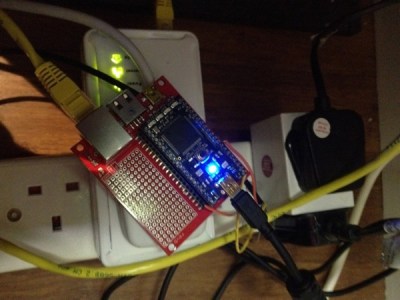
With the buzz around the Internet-of-Things (IoT), I felt I needed to get in on the act. For those that follow my twitter feed (@feabhas) you may be aware of the “home project” I’ve been working on. This project is based around the mbed platform to which I have connected a DS18B20 temperature sensor. The overall goal is to record the water temperature of my son’s fish tank, however due to water quality issues, it is currently sampling the air temperature outside my house.

An interesting part of the project is looking into various solutions to push out the current temperature. Using the mbed LPC1768 Workshop Development Board gives me easy access to an ethernet port and thanks to the mbed community there is an off-the-shelf library for socket programming. Once you have sockets, the options suddenly open up.

Mbed

Inspired by Andy Stanford-Clark and his house that twitters, I first implemented an MQTT based publisher. Even though there was an MQTT library available I really wanted to understand the protocol. As part of my learning process I downloaded the open source MQTT broker called mosquitto and developed both a simple C based publisher and subscriber on the Mac rather than the mbed (as the mbed socket library doesn’t quite follow the standard socket programming interface). With Wireshark and the existing lightweight C client library published on google code as a reference point I have implemented a simple set of files that demonstrate the principles of the MQTT publish-subscribe model. Current the code only works to “QoS-0”, but I intend to add further Quality-of-Service levels.

The code can be found on github here and is designed to be build using CMake.

Posted in C/C++ Programming | Tagged , , , | 5 Comments